NetApp Tab
Use the NetApp tab on a host’s Properties window to modify settings, which are populated with the information entered when the NetApp host is added to the monitored hosts table.
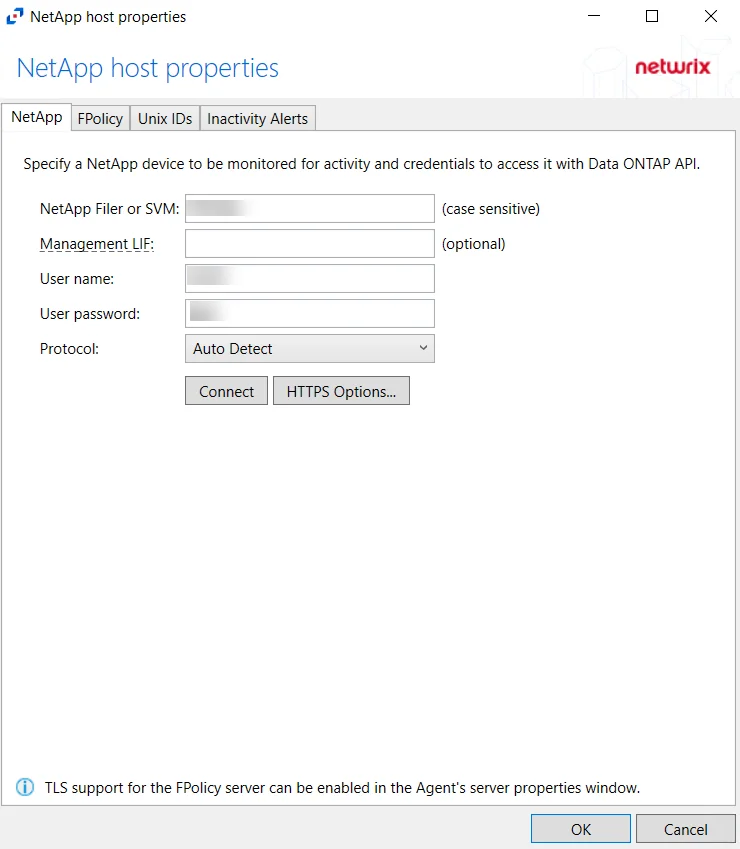
Modify the targeted NetApp device by specifying a NetApp device to be monitored for activity and credentials to access it with the Data ONTAP API.
- Protocol – Select from the following options in the dropdown list:
- Auto Detect
- HTTPS
- HTTPS, ignore certificate errors
- HTTP
- Connect – Click to connect using the selected protocol and validate the connection with NetApp
-
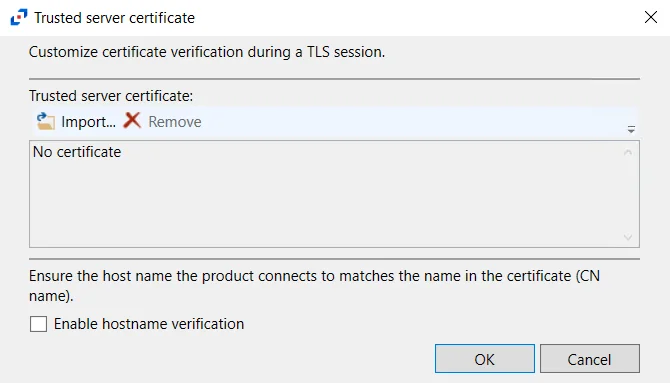
HTTPS Options – Opens the Trusted server certificate window to customize the certificate verification during a TLS session
-
Import – Click to browse for a trusted server certificate
-
Remove – Click to remove the selected trusted server certificate
-
Enable hostname verification – Select this checkbox to ensure that the host name the product connects and matches the name in the certificate (CN name)
-
Click OK to close the window and save the modifications.