Identity Reports
The Identity page holds the reports about accounts rather than content: one for Active Directory (AD) users; one for Entra ID users, with multi-factor authentication (MFA) status, licenses, and sign-in activity; and one for Entra ID groups, with their membership, types, and licenses. Each is a single table, one row per account or group. Only AD Users has filters at the top; you can drill into all three like any other report table.
Open the page from Reports > Identity. Dashboards and reports covers what's common to every report: the Refresh button, how filters apply, drilling into a table, and how fresh the data is.
The Identity Page
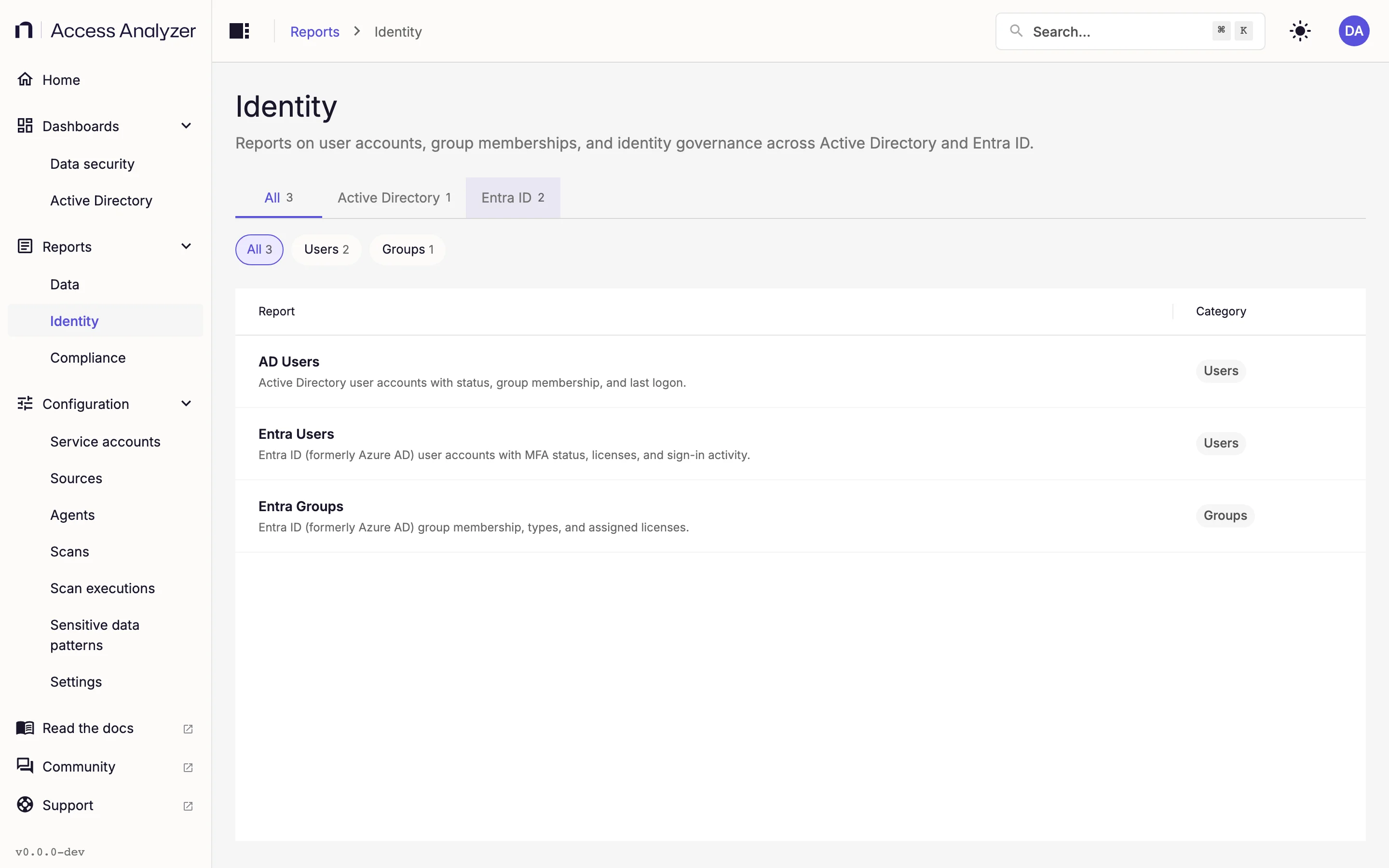
The page is a table with Report and Category columns, and the description sits under each report name, as on the Data reports page. Tabs split the list by directory and chips split it by category; each shows a count.
| Tab | Reports | Category chips |
|---|---|---|
| All | 3 | Users (2), Groups (1) |
| Active Directory | 1 | Users (1) |
| Entra ID | 2 | Users (1), Groups (1) |
Switching tabs clears the selected chip. Click a row to open the report; Back to Identity reports at the top of the report returns you to the list with your tab and chip intact.
| Report | Tab | Category |
|---|---|---|
| AD Users | Active Directory | Users |
| Entra Users | Entra ID | Users |
| Entra Groups | Entra ID | Groups |
An Identity sync populates all three: one on an Active Directory source for AD Users, one on an Entra ID source for the other two. Scan types explains the Identity sync; Active Directory and Entra ID explain the sources.
AD Users
One row per user account in your synced domains, with columns covering identity, contact details, password state, logon history, and delegation. The filters at the top narrow the rows.
Every filter is optional, and all but Distinguished Name let you pick several values.
| Filter | Values |
|---|---|
| Password Age | 0–30 days, 31–90 days, 91–180 days, 181–365 days, Over 365 days, Never set |
| Last Modified | Last 7 days, Last 30 days, Last 90 days, Last year, More than 1 year ago |
| Created | Last 7 days, Last 30 days, Last 90 days, Last year, More than 1 year ago |
| Days Since Last Logon | 0–30 days, 31–90 days, 91–180 days, 181–365 days, Over 365 days, Never logged on |
| Domain | The synced domains |
| SAM Account Name | The account names found in the sync |
| Distinguished Name | Free text; matches any account whose distinguished name contains it, ignoring case |
| Department | The department values found in the sync |
SAM Account Name is the Security Account Manager (SAM) name: the short logon name, without the domain. Distinguished Name is the quickest way to scope to an organizational unit: type part of its distinguished name, such as OU=Finance, and every account whose distinguished name contains that text matches.
The columns, in order:
AD Users columns
SAM Account Name, Display Name, First Name, Last Name, User Principal Name, Distinguished Name, Canonical Name, Common Name, Domain, Domain Canonical Name, Account Status (Enabled or Disabled), Created, Last Modified, Description, Admin Count, Email, Phone, Mobile, Office, Street Address, City, State, Postal Code, Country, Job Title, Department, Company, Manager, Employee ID, Password Last Set, Password Age (Days), Password Never Expires, Account Expires (Never when the account has no expiry), Smartcard Required, MFA Enforced, Last Logon, Last Logon Timestamp, Days Since Last Logon, Bad Password Count, Last Bad Password, Lockout Time, Last Logoff, Logon Workstations, Allowed to Delegate To, Allowed to Act on Behalf Of, Service Principal Names, and Legacy Exchange DN.
Two columns hold the numbers behind the filters: Password Age (Days) behind the Password Age buckets, and Days Since Last Logon behind the filter of the same name. Account Status separates enabled accounts from disabled ones.
For a risk-oriented view of the same accounts (stale users, old passwords, and privileged group membership), open the Active Directory dashboard.
Entra Users
One row per user account in your Entra ID tenant, including its MFA status, the licenses assigned to it, and its sign-in activity. The report has no filters; drill into the table to narrow it.
Entra Groups
One row per group in your Entra ID tenant, with its type, membership, and any licenses assigned through it. Like Entra Users, it has no filters.