Compliance Reports
The Compliance page is a second way into the Data reports, arranged for someone preparing evidence for an audit rather than investigating an incident. It organizes reports that already exist: it doesn't run checks against a framework, score your environment, or produce findings of its own. What it gives you is a shortlist of the reports worth opening for a given framework, labeled by the control area each one covers.
Open the page from Reports > Compliance. Data reports describes every report the page links to, with its filters and cards.
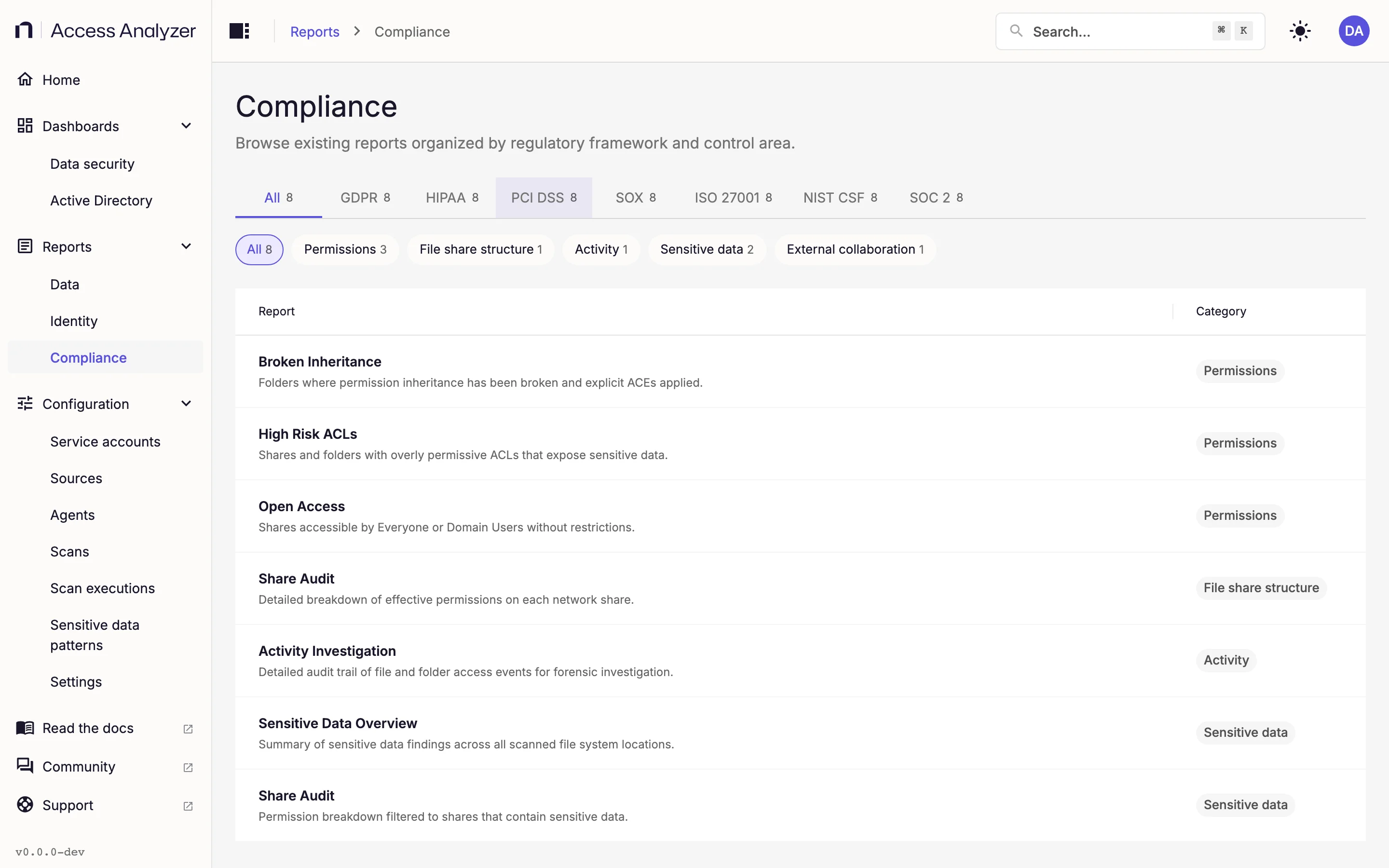
The Compliance Page
The layout matches the other two report pages: a table with Report and Category columns, tabs above it, and chips under the tabs. Here the tabs are regulatory frameworks and the chips are control areas.
The first tab, All, lists eight reports. One tab per framework follows, in this order:
| Tab | Framework |
|---|---|
| GDPR | General Data Protection Regulation |
| HIPAA | Health Insurance Portability and Accountability Act |
| PCI DSS | Payment Card Industry Data Security Standard |
| SOX | Sarbanes-Oxley Act |
| ISO 27001 | ISO/IEC 27001 information security management standard |
| NIST CSF | National Institute of Standards and Technology Cybersecurity Framework |
| SOC 2 | System and Organization Controls 2 |
Every framework tab lists the same eight reports, so each tab shows a count of eight. The frameworks carry no description text of their own; the tab label is all there is. What changes when you pick a framework is the badge next to each report name; see Primary and Supporting badges.
The chips group the eight reports by control area. The counts are the same on every tab.
| Chip | Reports |
|---|---|
| Permissions (3) | Broken Inheritance, High Risk ACLs, Open Access |
| File share structure (1) | Share Audit |
| Activity (1) | Activity Investigation |
| Sensitive data (2) | Sensitive Data Overview, Share Audit (the second Share Audit row on the Data page) |
| External collaboration (1) | Shared Links |
Both Share Audit rows from the Data page appear here, under different control areas. They open the same report. Switching tabs clears the selected chip, as on the other report pages.
Primary and Supporting Badges
On the All tab, report names carry no badge. Select a framework and each name gains a small Primary or Supporting label. Primary means the report is direct evidence for that framework's controls; Supporting means it's useful context rather than the main exhibit.
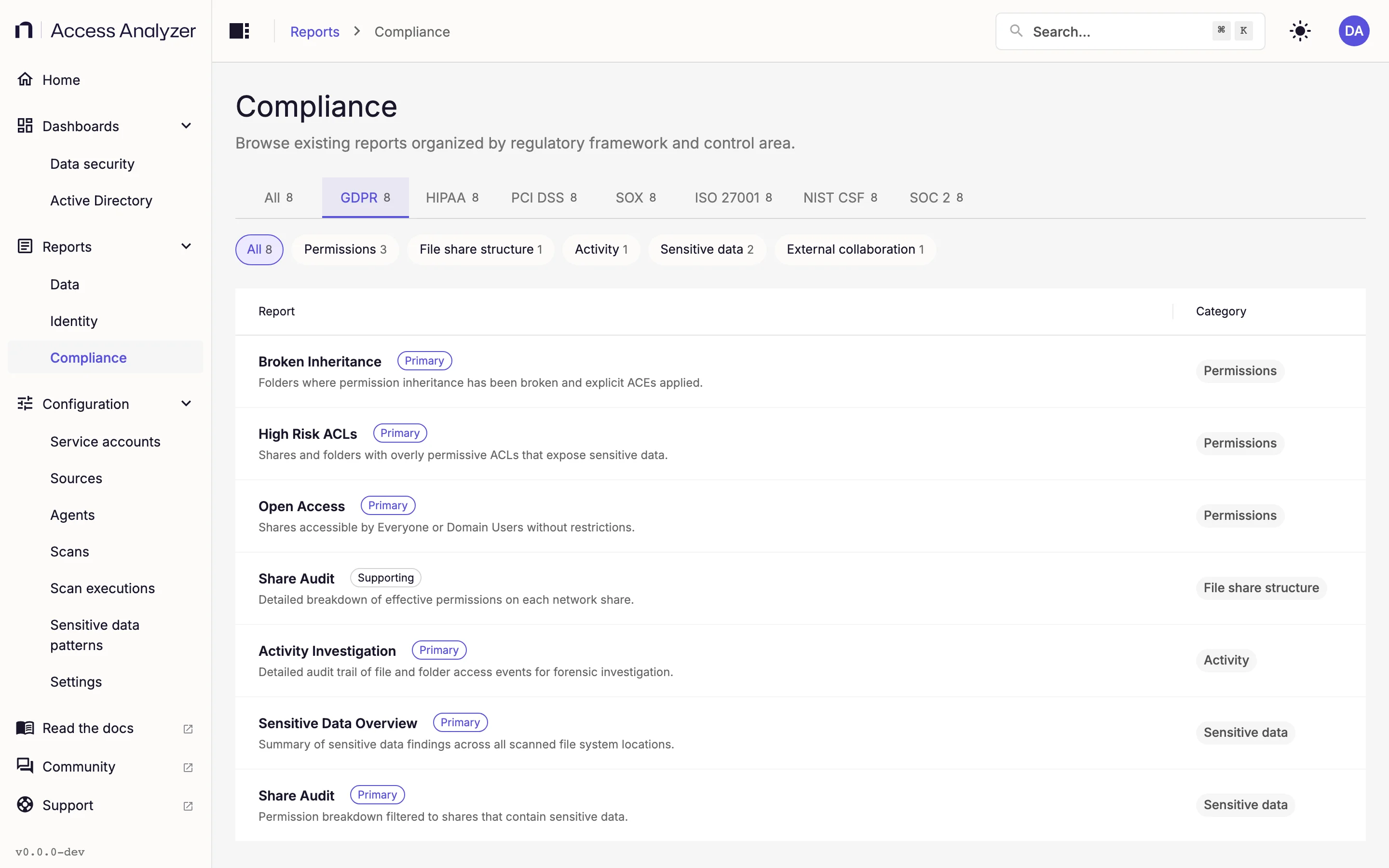
Only two report-framework pairings carry the Supporting badge: the Share Audit row under File share structure on the GDPR tab and Shared Links under SOX. The second Share Audit row, under Sensitive data, is Primary on every tab, as is every other pairing. The badges are fixed, so they read the same in every deployment; they don't reflect anything about your data.
Included and Excluded Reports
The eight reports on this page are the seven file server reports from the Data page plus Shared Links, the SharePoint sharing-links report. The page leaves out the Data page's other three SharePoint reports (High-Risk ACLs, Open Access, and Sensitive Data Overview, the SharePoint counterparts of three listed file server reports) and the Identity reports. To use those for compliance work, open them from their own pages.
Open a Report
Click a row to open the report exactly as the Data page does, with the same filters and cards. The link at the top of the report reads Back to Data reports and takes you to the Data reports page, not back to Compliance. To return to the framework tab you were on, use your browser's Back button or open Reports > Compliance again.
Because the reports are the same ones, the prerequisites are too: an Access scan on your File Server sources for the permission and file share structure reports, a Sensitive data scan for the sensitive data reports, an Access scan on your SharePoint Online sources for Shared Links, and events from Netwrix Activity Monitor for Activity Investigation. Dashboards and reports has the full table.