FS_Ransomware Job
The FS_Ransomware job uses the data collected by the 0.Collection job group to identify periods when users make an abnormally high number of updates, which can indicate ransomware. It also highlights activity involving known ransomware artifacts.
Analysis Tasks for the FS_Ransomeware Job
View the analysis tasks by navigating to the FileSystem > 5.Activity > Suspicious Activity > FS_Ransomware > Configure node and select Analysis.
Don't modify or deselect the selected analysis tasks. The analysis tasks are preconfigured for this job.
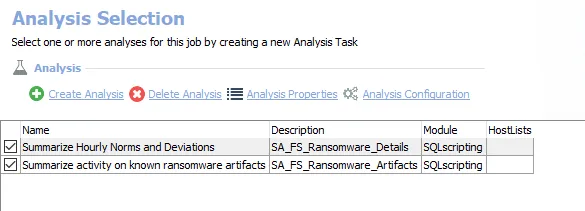
The following analysis tasks are selected by default:
-
Summarize Hourly Norms and Deviations – Creates the SA_FS_Ransomware_Details table accessible under the job’s Results node
-
Summarize activity on known ransomware artifacts
- Creates the SA_FS_Ransomware_Artifacts table accessible under the job’s Results node
- Creates an interim processing table in the database for use by downstream analysis and report generation
In addition to the tables and views created by the analysis tasks, the FS_Ransomware job produces the following pre-configured reports:
| Report | Description | Default Tags | Report Elements |
|---|---|---|---|
| Ransomware Activity | This report summarizes Add or Rename activity involving known ransomware artifacts. | None | This report is comprised of three elements:
|
| Unusual Write Activity (Ransomware) | This report highlights periods of abnormally high update activity involving shared resources. This can be indicative of ransomware attacks. | None | This report is comprised of two elements:
|