Oracle Target Least Privilege Model
Netwrix recommends using an account with DBA privilege to run Access Analyzer against an Oracle database. If that isn't acceptable, this topic lists all the privileges required to configure and run the solution. Use them to implement the least privileges necessary.
Create Session Privilege
Before getting started with the least privilege model, ensure that the Access Analyzer Connection Profile user has the Create Session privilege granted. To do it, run the following command in Oracle environment (SQL Plus or SQL Developer):
GRANT CREATE SESSION TO %USERNAME%;
This command grants the privilege only in the current container. To follow the least privilege model, only grant the privilege on the containers (or pluggable databases) that you will be scanning with Access Analyzer.
However, if you target all of your pluggable databases, then to grant the Create Session privilege on all of those containers at once, run the following command:
GRANT CREATE SESSION TO %USERNAME% CONTAINER=ALL;
User Credentials Role
When using a least privileged model for Oracle, select SYSDBA for the Role in the User Credentials window for the Oracle Connection Profile. See the Oracle for User Credentials topic for additional information.
Oracle Server Discovery
This Job uses Nmap to locate listening Oracle ports on servers by scanning for ports using the
service Oracle TNS Listener or optionally using specified ports, such as 1521. The Nmap utility can
be downloaded from nmap.org. To run this job, the user needs permission to
execute any PowerShell script on the local host if the host runs the Microsoft Windows operating
system. In addition, you need to set the PowerShell execution policy on the Windows host. For
example, to set the execution policy to Unrestricted, run the following command on the PowerShell
command line:
Set-ExecutionPolicy -ExecutionPolicy Unrestricted
For Linux and UNIX hosts, run the plink command on the Access Analyzer
Console server to update the local file with the SSH keys.
Use the plink utility in the Access Analyzer installation directory. The Nmap utility installs a version of plink.
The syntax is as follows:
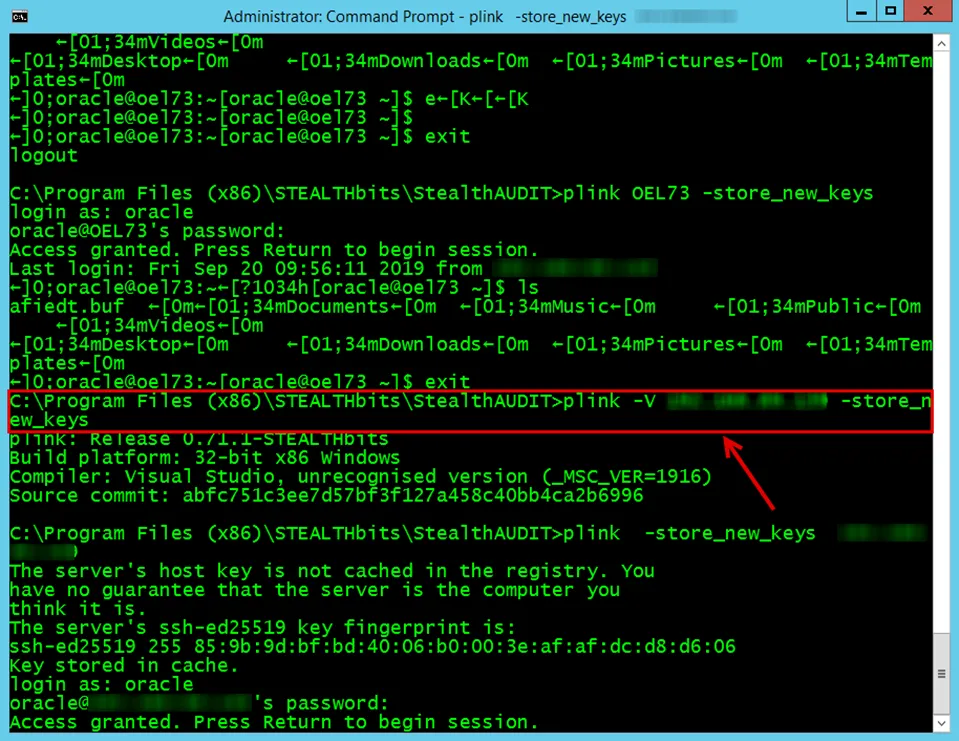
Run the following on the command prompt:
C:\Program Files (x86)\Stealthbits\StealthAUDIT\plink <hostname> -store_new_keys
Oracle SID Discovery
This Job collects the Oracle SID from discovered Oracle servers and uses WMI or SSH to collect running Oracle processes from the Oracle servers. This process determines the name of the Oracle SID. When multiple Oracle instances are running on a server, each SID will have its own entry in this table.
This Job requires local administrator rights on the target hosts to read the running processes using either WMI or SSH.
Oracle Instance Discovery
This Job verifies Oracle SID, IP Address, and Port combinations and inserts them into the SA_SQL_Instances table.
This Job requires read rights on the Oracle table DUAL, all users with any read right on an Oracle server should be able to validate this query.
For example, to grant a user SELECT permission on DUAL, run the following command in SQL Developer
or SQL*Plus:
GRANT SELECT ON DUAL TO %USERNAME%;
Replace %USERNAME% with the actual username of the user.
CONTAINER_DATA=ALL FOR %NAME_OF_PLUGGABLE_DATABASE% CONTAINER = CURRENT;
If you want to scan all pluggable databases in the given environment, run the following command in the root container:
ALTER USER %USERNAME% SET CONTAINER_DATA=ALL CONTAINER = CURRENT;
Oracle Permission Auditing
The Oracle Permissions Scan job collects all permissions from all licensed database types for all target instances.
Oracle Database 19c Series Permissions
to collect permissions from Oracle Database 19c series, the user credential requires at
least the following SELECT privilege on the targeted database for the following views and tables:
- CDB_COL_PRIVS view
- CDB_TAB_COLS view
- CDB_OBJECTS view
- CDB_PROFILES view
- CDB_ROLE_PRIVS view
- CDB_ROLES view
- CDB_SYS_PRIVS view
- CDB_TABLESPACES view
- CDB_TAB_PRIVS view.
- CDB_USERS view.
- V_$DATABASE view.
- V_$RSRC_CONSUMER_GROUP view.
- V_$CONTAINERS view.
- V_$PARAMETER view.
- V_$PDBS view.
- V_$INSTANCE view.
- SYS.USER$ table.
- DBA_TABLESPACES view
- DBA_ROLES view
- DBA_USERS view
- DBA_OBJECTS view
- DBA_COL_PRIVS view
- DBA_TAB_COLS view
- DBA_ROLE_PRIVS view
- DBA_SYS_PRIVS view
- DBA_TAB_PRIVS view
For example, to grant all of the preceding privileges, run the following set of commands in SQL Developer or SQL*Plus:
GRANT CONNECT TO %USERNAME%;
GRANT CREATE SESSION TO %USERNAME%;
GRANT SELECT ON DUAL TO %USERNAME%;
GRANT SELECT ON CDB_COL_PRIVS TO %USERNAME%;
GRANT SELECT ON CDB_TAB_COLS TO %USERNAME%;
GRANT SELECT ON CDB_OBJECTS TO %USERNAME%;
GRANT SELECT ON CDB_PROFILES TO %USERNAME%;
GRANT SELECT ON CDB_ROLE_PRIVS TO %USERNAME%;
GRANT SELECT ON CDB_ROLES TO %USERNAME%;
GRANT SELECT ON CDB_SYS_PRIVS TO %USERNAME%;
GRANT SELECT ON CDB_TABLESPACES TO %USERNAME%;
GRANT SELECT ON CDB_TAB_PRIVS TO %USERNAME%;
GRANT SELECT ON CDB_USERS TO %USERNAME%;
GRANT SELECT ON V_$DATABASE TO %USERNAME%;
GRANT SELECT ON V_$RSRC_CONSUMER_GROUP TO %USERNAME%;
GRANT SELECT ON V_$CONTAINERS TO %USERNAME%;
GRANT SELECT ON V_$PARAMETER TO %USERNAME%;
GRANT SELECT ON V_$PDBS TO %USERNAME%;
GRANT SELECT ON V_$INSTANCE TO %USERNAME%;
GRANT SELECT ON SYS.USER$ TO %USERNAME%;
GRANT SELECT ON DBA_TABLESPACES TO %USERNAME%;
GRANT SELECT ON DBA_ROLES TO %USERNAME%;
GRANT SELECT ON DBA_USERS TO %USERNAME%;
GRANT SELECT ON DBA_OBJECTS TO %USERNAME%;
GRANT SELECT ON DBA_COL_PRIVS TO %USERNAME%;
GRANT SELECT ON DBA_TAB_COLS TO %USERNAME%;
GRANT SELECT ON DBA_ROLE_PRIVS TO %USERNAME%;
GRANT SELECT ON DBA_SYS_PRIVS TO %USERNAME%;
GRANT SELECT ON DBA_TAB_PRIVS TO %USERNAME%;
Oracle Database 12c Series Permissions
to collect permissions from Oracle Database 12c series, the user credential requires at
least the following SELECT privilege on the targeted database for the following views and tables:
- CDB_COL_PRIVS view
- CDB_TAB_COLS view
- CDB_OBJECTS view
- CDB_PROFILES view
- CDB_ROLE_PRIVS view
- CDB_ROLES view
- CDB_SYS_PRIVS view
- CDB_TABLESPACES view
- CDB_TAB_PRIVS view.
- CDB_USERS view.
- V_$RSRC_CONSUMER_GROUP view.
- V_$DATABASE view.
- V_$PARAMETER view.
- V_$PDBS view.
- V_$CONTAINERS view.
- SYS.USER$ table.
For example, to grant all of the preceding privileges, run the following set of commands in SQL Developer or SQL*Plus:
GRANT SELECT ON CDB_COL_PRIVS TO %USERNAME%;
GRANT SELECT ON CDB_TAB_COLS TO %USERNAME%;
GRANT SELECT ON CDB_OBJECTS TO %USERNAME%;
GRANT SELECT ON CDB_PROFILES TO %USERNAME%;
GRANT SELECT ON CDB_ROLE_PRIVS TO %USERNAME%;
GRANT SELECT ON CDB_ROLES TO %USERNAME%;
GRANT SELECT ON CDB_SYS_PRIVS TO %USERNAME%;
GRANT SELECT ON CDB_TABLESPACES TO %USERNAME%;
GRANT SELECT ON CDB_TAB_PRIVS TO %USERNAME%;
GRANT SELECT ON CDB_USERS TO %USERNAME%;
GRANT SELECT ON V_$DATABASE TO %USERNAME%;
GRANT SELECT ON V_$RSRC_CONSUMER_GROUP TO %USERNAME%;
GRANT SELECT ON V_$CONTAINERS TO %USERNAME%;
GRANT SELECT ON V_$PARAMETER TO %USERNAME%;
GRANT SELECT ON V_$PDBS TO %USERNAME%;
GRANT SELECT ON SYS.USER$ TO %USERNAME%;
Oracle Database 11g Series Permissions
to collect permissions from Oracle Database 11g series, the user credential requires at
least the following SELECT privileges on the targeted database for the following views and tables:
- DBA_COL_PRIVS view
- DBA_TAB_COLS view
- DBA_OBJECTS view
- DBA_PROFILES view
- DBA_ROLES view
- DBA_ROLE_PRIVS view
- DBA_SYS_PRIVS view
- DBA_TABLESPACES view
- DBA_TAB_PRIVS view
- DBA_USERS view
- V_$RSRC_CONSUMER_GROUP view
- V_$DATABASE view
- V_$PARAMETER view
- SYS.USER$ table
For example, to grant all of the preceding privileges, run the following set of commands in Oracle SQL Developer or SQL*Plus:
GRANT SELECT ON DBA_TAB_COLS TO %USERNAME%;
GRANT SELECT ON DBA_OBJECTS TO %USERNAME%;
GRANT SELECT ON DBA_TABLESPACES TO %USERNAME%;
GRANT SELECT ON DBA_PROFILES TO %USERNAME%;
GRANT SELECT ON DBA_TAB_PRIVS TO %USERNAME%;
GRANT SELECT ON DBA_ROLES TO %USERNAME%;
GRANT SELECT ON DBA_ROLE_PRIVS TO %USERNAME%;
GRANT SELECT ON DBA_SYS_PRIVS TO %USERNAME%;
GRANT SELECT ON DBA_COL_PRIVS TO %USERNAME%;
GRANT SELECT ON DBA_USERS TO %USERNAME%;
GRANT SELECT ON V_$RSRC_CONSUMER_GROUP TO %USERNAME%;
GRANT SELECT ON V_$DATABASE TO %USERNAME%;
GRANT SELECT ON V_$PARAMETER TO %USERNAME%;
GRANT SELECT ON SYS.USER$ TO %USERNAME%;
Oracle Sensitive Data Auditing
This job identifies sensitive data stored within target database instances.
Before running this scan, ensure that Oracle database statistics are up to date at least for the targeted schema or tables. Use one of the following commands:
EXEC DBMS_STATS.GATHER_SCHEMA_STATS('%SCHEMA_NAME%');
EXEC DBMS_STATS.GATHER_TABLE_STATS('%SCHEMA_NAME%', ‘%TABLE_NAME%’);
Oracle Database 12c Series Sensitive Data
to perform a sensitive data scan on Oracle database 12c series, the user credential
requires at least the following SELECT privileges on the targeted database for the following
views:
- V_$CONTAINERS view
- V_$DATABASE view
- CDB_TAB_COLS view
- CDB_OBJECTS view
For example, to grant the preceding privileges, run the following set of commands in SQL Developer or SQL*Plus:
GRANT SELECT ON V_$CONTAINERS TO %USERNAME%;
GRANT SELECT ON V_$DATABASE TO %USERNAME%;
GRANT SELECT ON CDB_TAB_COLS TO %USERNAME%;
GRANT SELECT ON CDB_OBJECTS TO %USERNAME%;
Oracle Database 11g Series Sensitive Data
to perform a sensitive data scan on Oracle database 11g series, the user credential
requires at least the following SELECT privileges on the targeted database for the following
views:
- V_$DATABASE view
- DBA_TAB_COLS view
- DBA_OBJECTS view
For example, to grant the preceding privileges, run the following set of commands in SQL Developer or SQL*Plus:
GRANT SELECT ON V_$DATABASE TO %USERNAME%;
GRANT SELECT ON DBA_TAB_COLS TO %USERNAME%;
GRANT SELECT ON DBA_OBJECTS TO %USERNAME%;
Grant the SELECT privilege individually on all sensitive data tables you want to target
(more secure).
To accomplish it, run the following command for each targeted sensitive data table:
GRANT SELECT ON %YOUR_SENSITIVE_DATA_TABLE% TO %USERNAME%;
(Optional) Grant the SELECT privilege on any table (less secure) by running the following
command:
GRANT SELECT ANY TABLE TO %USERNAME%;
Oracle Activity Auditing
This job collects audit data from configured database server audits on target endpoints.
Oracle Database 12c Series Activity Data
to perform an activity data scan on Oracle database 12c series, the user credential
requires at least the following SELECT privileges on the targeted database for the following
views:
- V_$DATABASE view
- CDB_COMMON_AUDIT_TRAIL view
- UNIFIED_AUDIT_TRAIL view
For example, to grant the preceding privileges, run the following set of commands in SQL Developer or SQL*Plus:
GRANT SELECT ON V_$DATABASE TO %USERNAME%;
GRANT SELECT ON CDB_COMMON_AUDIT_TRAIL TO %USERNAME%;
GRANT SELECT ON UNIFIED_AUDIT_TRAIL TO %USERNAME%;
If the audit trail mode is QUEUED, then Oracle doesn't write audit records to disk until the
in-memory queues are full. The following procedure explicitly flushes the queues to disk, so that the audit
trail records are viewable in the UNIFIED_AUDIT_TRAIL view:
EXEC SYS.DBMS_AUDIT_MGMT.FLUSH_UNIFIED_AUDIT_TRAIL;
Oracle Database 11g Series Activity Data
to perform an activity data scan on Oracle database 11g series, the user credential
required at least the following SELECT privileges on the targeted database for the following
views:
- V_$DATABASE view
- DBA_COMMON_AUDIT_TRAIL view
For example, to grant the preceding privileges, run the following set of commands in SQL Developer or SQL*Plus:
GRANT SELECT ON V_$DATABASE TO %USERNAME%;
GRANT SELECT ON DBA_COMMON_AUDIT_TRAIL TO %USERNAME%;
Oracle Users with Default Passwords Job
The 4-Oracle_DefaultPasswordUsers job collects usernames of users who haven't updated their passwords since the database was created.
The user needs SELECT privilege on CDB_USERS_WITH_DEFPWD table for Oracle container
databases (version 12c and higher) or DBA_USERS_WITH_DEFPWD for the non-container database (any
version below 12c).
To grant the required privileges, execute the following statements in SQL Developer or SQL*Plus:
For version 12c and later:
GRANT SELECT ON CDB_USERS_WITH_DEFPWD TO %USERNAME%;
For version 11g:
GRANT SELECT ON DBA_USERS_WITH_DEFPWD TO %USERNAME%;