Upgrade Proxy Service Procedure
When you upgrade the Access Analyzer Console and File System Solution, also upgrade the File System Proxy Service when running Access Analyzer in Proxy Mode as a Service. You can do this upgrade in two ways:
- Automatically – An instant job within the Access Analyzer Console
- Manually – On each server hosting the proxy service
When upgrading the Proxy Service to 11.6 from a previous version for the first time, you must manually uninstall the previous version and follow the Manual Upgrade steps. You can do subsequent 11.6 upgrades using the automatic upgrade option.
If you have the old Netwrix Sensitive Data Discovery Add-On installed, you must uninstall it before continuing with this upgrade. For Access Analyzer 12.0, the main installation includes Sensitive Data Discovery if your license includes it.
Automatic Upgrade
The FS_UpdateProxy Job is available through the Instant Job Wizard. This job updates the File System Proxy Service on all servers in the assigned host list. Instantiate this job.
Step 1 – Within the Jobs tree, right-click and select Add Instant Job. The Instant Job Wizard window opens.
Step 2 – On the Welcome page, click Next.
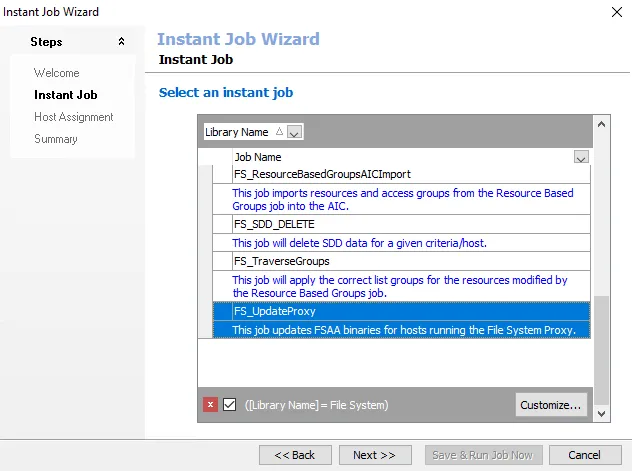
Step 3 – On the Instant Job page, locate the Library Name: File System category group. Expand the category and select the FS_UpgradeProxy Job. Click Next.
Step 4 – On the Host Assignment page, select the Specify individual hosts or host lists option and click Next.
Step 5 – On the Host Lists page, assign the host lists containing the proxy servers you want to update. You can add multiple host lists. Click Next.
Step 6 – On the Individual Hosts page, click Next.
Step 7 – Review the Summary and click either Save & Exit or Save & Run Jobs Now.
The proxy doesn't update until you run the job. After the job runs successfully, Access Analyzer updates the servers in the assigned host lists.
Manual Upgrade
Follow the steps on the servers hosting the File System Proxy Service.
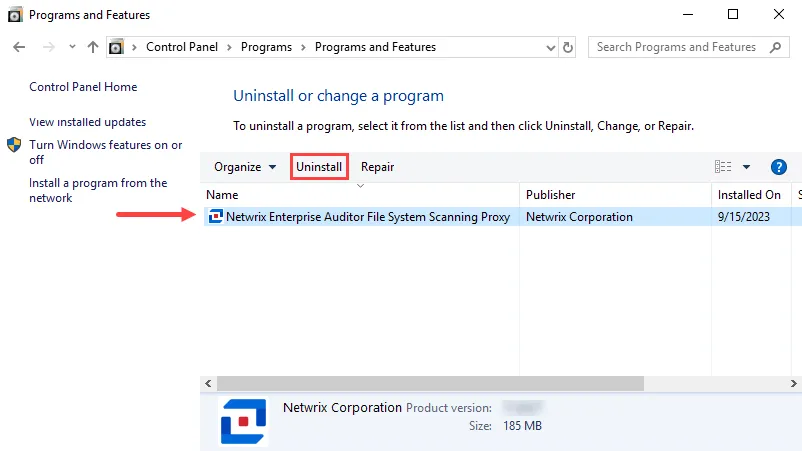
Step 1 – Navigate to Programs and Features (Control Panel > Programs > Programs and Features). Uninstall the previous version of Access Analyzer File System Scanning Proxy.
Step 2 – Install the new version of the File System Proxy Service. See the File System Proxy Service Installation topic for instructions.
The File System Solution can now use the proxy architecture for the latest version of the solution.