Enable Single Sign-On
With single sign-on using Windows authentication, the Web Console automatically logs users in according to the user’s current login session. When a user opens a session from a different domain, a pop-up window prompts the user for credentials. After authenticating, the Web Console automatically logs the user in.
The Web Console also supports using Microsoft Entra ID single sign-on. See the Microsoft Entra ID Single Sign-On topic for additional information.
Enable single sign-on for the Web Console.
Step 1 – Open the WebServer.exe.config file with a text editor, for example Notepad. It is located within the Web folder of the Access Analyzer installation directory.
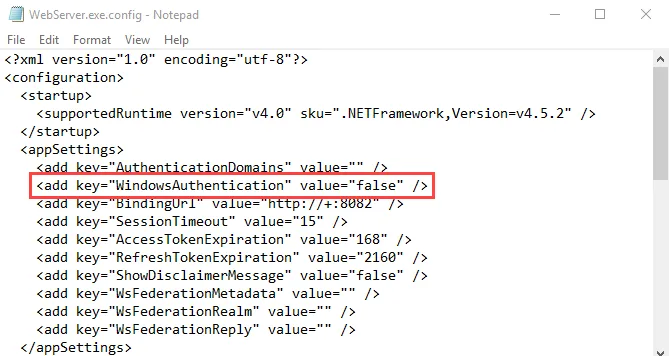
Step 2 – Change the value for the WindowsAuthentication parameter to:
<add key="WindowsAuthentication" value="true" />
Step 3 – Save and close the file.
Step 4 – Navigate to Services (services.msc). Restart the Netwrix Access Analyzer (formerly
Enterprise Auditor) Web Server service.
You have now enabled the Web Console for single sign-on.
Local Intranet Settings
Next, configure local intranet settings to enable SSO. With this configuration, authentication passes through Windows Authentication and bypasses SSO configuration prompts for credentials via browser pop-up.
Configure local intranet settings.
Step 1 – Open Windows Internet Properties (Control Panel > Network and Internet > Internet Options).
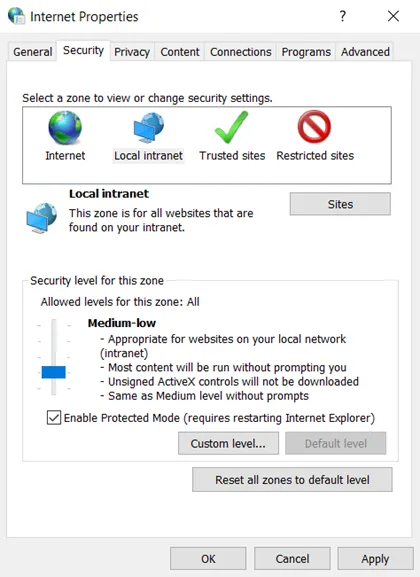
Step 2 – Go to the Security tab, and select the Local Intranet option. Then, click the Sites button.
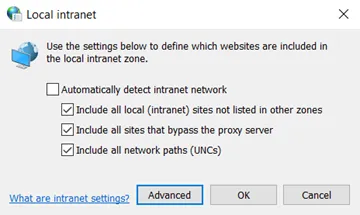
Step 3 – Click the Advanced button.

Step 4 – Enter a domain in the Add this website in the zone field. Ensure the fully
qualified domain name is in the following format: https://<server>.<domain>.com
Step 5 – Click the Add button. Close the Local intranet window.
Step 6 – On the Internet Properties window, click the Apply button.
Authentication will now pass through Windows Authentication and bypass SSO configuration Prompts for credentials via Browser pop-up
You can also configure a list of allowed authentication servers using the AuthServerAllowList policy.