Host Discovery
The Host Discovery node is for configuring the settings which dictate how Access Analyzer handles newly discovered hosts, what information Access Analyzer logs during the host discovery process, and how long it stores the logged information.
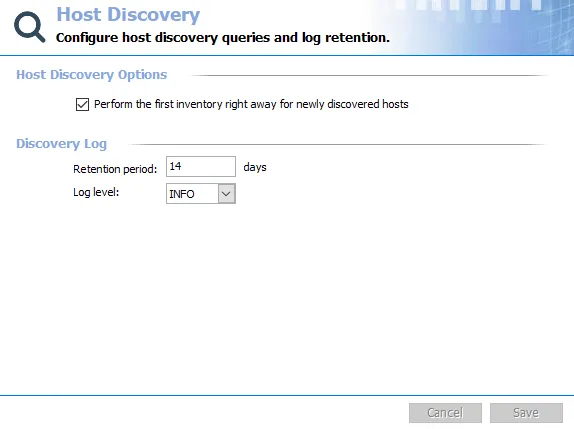
In the Host Discovery Options section at the top is a checkbox for the Perform the first inventory right away for newly discovered hosts option. By default, Access Analyzer selects this option.
- If selected, Access Analyzer retrieves information about a host as soon as it is discovered
- If deselected, you can obtain the host inventory information later according to the Host Inventory node options
The configurable options in the Discovery Log section are:
- Retention period – Determines how long Access Analyzer keeps the Host Discovery query log. This defaults to 14 days, based on average Access Analyzer usage.
- Log level – Determines what information Access Analyzer stores in the Host Discover query log

The log levels are:
-
Debug – Records everything that happens during the host discovery process, most verbose level of logging
- Records all Info level information
- If the query references or updates files while running, Access Analyzer shows the path to the affected file
- Helps Netwrix Support to assist in diagnosing issues which may be causing host inventories to fail
- Creates the largest file
-
Info – Records information on the steps which occur during the host discovery process, in addition to warnings and errors
- Records all Warning level information
- Records start actions of each query
- Records end actions of each query
-
Warning – Records all warnings which occur during the host discovery process
- Records all Error level information
- When Access Analyzer encounters a host which only grants partial access
- When Access Analyzer encounters something which allows for only partial data gathering
- When Access Analyzer encounters something which causes it to produce a larger log file
-
Error – Records all errors which occur during the host discovery process
infoSet the Log Level to Error for daily use. The default setting is Info. The other log levels are designed to assist with troubleshooting host discovery and host inventory issues.
The Cancel and Save buttons are in the lower-right corner of the Host Discovery view. These buttons become enabled when you modify the Host Discovery global settings. Whenever you make changes at the global level, click Save and then OK to confirm the changes. Otherwise, click Cancel if you didn't intend to make changes.

The Host Discovery Log is located under the Host Discovery node.