History
The History node is where you configure the history retention of job data and job logs. The setting specified here at the global level applies to all jobs in the Jobs tree unless specifically changed at the job group or job level. See the History Node and History Tab topics for additional information.
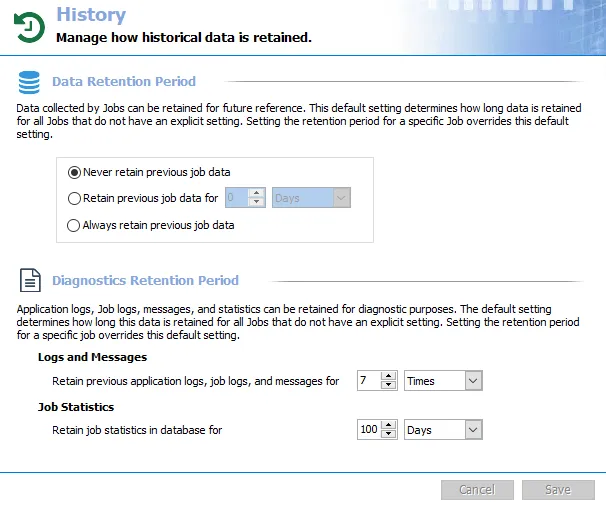
The Data Retention Period settings are for configuring the job data history retention within the database. Choose from three options:
- Never retain previous job data
- Retain previous job data for [number] [time period]
- Always retain previous job data
Set the Data Retention Period at the global level to Never retain previous job data. This allows for more control over the quantity of data by applying history retention at the job group or job level. All jobs run with this default setting only keep the most current record set.
Some pre-configured jobs require history retention while others don't support it. Changing the history retention settings at the global level can cause issues with data analysis and reporting on jobs that don't support it. See the relevant job group and job descriptions for additional information.
The Diagnostics Retention Period settings determine how long Access Analyzer retains this data for all jobs that don't have an explicit setting. Setting the retention period for a specific job overrides the default setting. Configure two settings:
-
Logs and Messages
- Retain previous application logs, job logs, and messages for [number] [time period] – Controls how long Access Analyzer stores the messages for previous job executions in the SA_Messages table for each job. Access Analyzer clears older job execution messages.
- The default value is 7 Times. With this setting, Access Analyzer stores the messages for the previous seven job executions.
-
Job Statistics
-
Retain job statistics in database for [number] [time period] – Controls how long Access Analyzer stores job statistics history within the Access Analyzer database in the following two tables:
- SA_JobStatsTbl
- SA_JobTaskStatsTbl
-
This setting is only available at the global settings level. The default value is 100 days. This directly affects each job’s Status node. See the Status Node topic for additional information.
-
For both the Logs and Messages and Job Statistics options:
- Enter a number in the first textbox and select the time period you want from the dropdown menu in the second box. You can set retention to a specific number of Days, Weeks, Months, or Times for both.
- All jobs run with this setting add the newly collected data set or job logs on top of the previously collected record sets or logs. Access Analyzer drops any record sets or logs outside the specified historical retention limit.
The Cancel and Save buttons are in the lower-right corner of the History view. These buttons become enabled when you modify the History global settings. Whenever you make changes at the global level, click Save and then OK to confirm the changes. Otherwise, click Cancel if you didn't intend to make changes.
Job Data History Retention & Database Size Concerns
A major concern around job data history retention is the impact it can have on database size. The following scenario explains a common concern.
-
The Retain previous application logs, job logs, and message for or Retain job statistics in database for setting is set to an extended time period and the database size is unmanageable
- To reduce data retention periods, navigate to the Settings > History node. Change the time period to a smaller interval, for example 90 days. Click Save and rerun the jobs.
- Access Analyzer drops all of the record sets outside the new retention limit, and the database size returns to where it belongs
Job Logs
Access Analyzer stores the job logs within the output folder of each job. You can read them in the Access Analyzer Console within the job’s Status > Messages table. To access the logs within the job’s directory, right-click the job’s node in the Navigation pane and select Explore Folder.
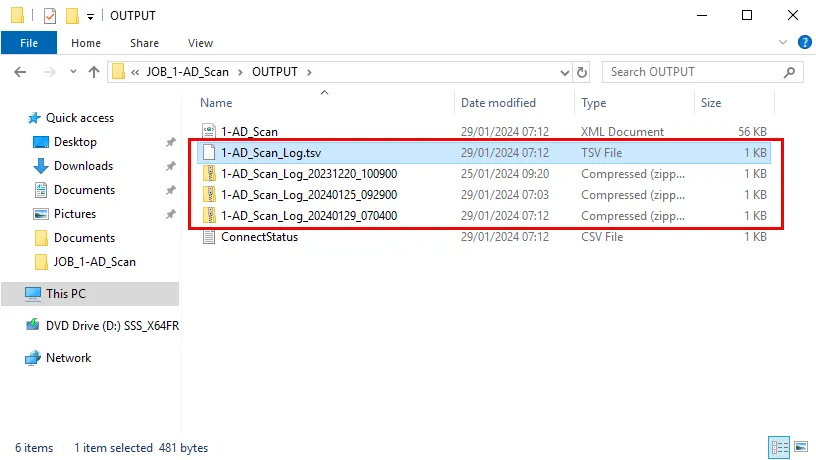
The most recent log is open. Access Analyzer stores older jobs as zip files, according to the Log Retention Period setting. Access Analyzer names each log in the following format:
- Open/Latest Log Name –
[Jobname]_Log.tsv - Older/Zipped Log Name –
[Jobname]_Log_[Date]_[Time].zip