Hosts Lists
A host list is a grouping of hosts to execute jobs against. You can access every host list by expanding the Host Management node in the Navigation pane.
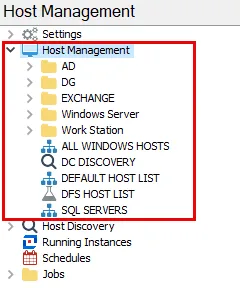
There are two types of host lists:
- Dynamic host lists – Auto-populated and updated according to the most recent inventory information available for the hosts. They include both the default host lists and custom created dynamic host lists. See the Dynamic Host Lists topic for additional information.
- Static host lists – Only changed manually or through a scheduled host discovery query. They include both host lists created during host discovery queries and custom created static host lists. See the Static Host Lists topic for additional information.
A newly created host list will appear in alphanumerical order under the Host Management node. The icon in front of the host list will indicate which type of host list it is:
| Icon | Type of Host List |
|---|---|
 | Default Host List or Custom Host List (Static or Dynamic) |
 | Host Discovery Query List |
 | Host List created by Job |
You can view host inventory information at the Host Discovery node (the Host Master Table) or at individual host list nodes. See the Host Inventory Data Grid topic for information on the data collected by host inventory.
Dynamic Host Lists
Dynamic host lists group hosts according to selected criteria within the host inventory. Each time Access Analyzer refreshes a host inventory record, it automatically adds or removes hosts from dynamic host lists according to the criteria set for the list. They include both the default host lists and custom created dynamic host lists. See the Host Inventory topic for a list of the default host lists and instructions on controlling which of these lists are visible under the Host Management node.
Create custom dynamic host lists by filtering the data grid and using the Save Current View option in the Activities pane or right-click menu. Do this at the Host Management node with the Host Master Table or at any host list node. See the Filter topic for additional information on filtering data grids.
Don't modify the criteria after you create a dynamic-based list. Instead, delete and recreate the list.
Static Host Lists
Access Analyzer creates static host lists automatically through host discovery queries, or you can create them manually within the Host Management node. Host Discovery Node queries create these lists and update them each time you run the query, manually or on a schedule. You can only change other static host lists manually. You frequently create custom host lists to scope a job to execute against a select set of hosts.
For example, a user running the Exchange Solution might create a list to just run Mailbox queries against. Whereas a user running the File System Solution might create a list of servers used for file shares.
There are two common ways to create static host lists:
- Use the Add Hosts option in the Activities pane or right-click menu to access the Host List Wizard
- Select multiple hosts from the data grid using the Windows Ctrl and left-click function. You can do this from the Host Mast Table or any host list under the Host Management node. Then use the Save Selected To List option in the Activities pane or right-click menu to open the Host List Wizard with a pre-filled in Manual Host Entry page.
See the Add Hosts section for information using the Host List Wizard.