Save Current View
Use the Save Current View option to create a dynamic host list. This option is available from either the Host Management node or an individual host list node. The option is inactive until you apply a filter to the data grid. To create a dynamic host list:
Step 1 – Select the Host Management or individual host list node to create the host list from.
Step 2 – Filter the data grid for the criteria you want. See the Host Inventory Data Grid topic for additional information.
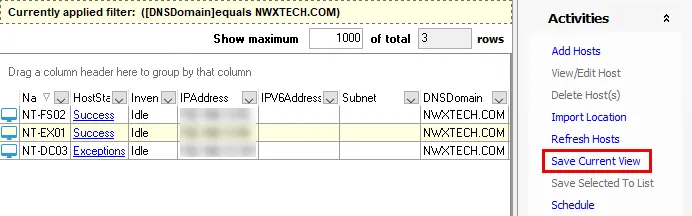
Step 3 – Click Save Current View in the Activities pane.

Step 4 – On the Host list name window, provide a unique, descriptive name for the new host list and click OK.
The new host list displays under the Host Management node. When the Access Analyzer Console closes the host lists under the Host Management node, the hosts reorganize in alphanumeric order. Like the default host lists, Access Analyzer auto-populates and updates custom dynamic host lists according to host inventory.
Don't modify the criteria after you create a dynamic-based list. Instead, delete and recreate the list.
See the Dynamic Host Lists topic for more information on dynamic host lists.