SPAA Drop Tables & Views Workflow
If you need to clear the SPAA Data Collector tables and views to resolve an issue, use the preconfigured SP_DropTables Job to run analysis tasks that drop functions and views for the SharePoint Solution, as well as the standard tables and views generated by the SPAA Data Collector. It is available through the Instant Job Library under the SharePoint library. Since this job doesn't require a host to target, select Local host on the Hosts page of the Access Analyzer Instant Job Wizard. See the Instant Job Wizard topic for additional information.
Analysis Tasks for the SP_DropTables Job
Navigate to the Jobs > SP_DropTables > Configure node and select Analysis to view the analysis tasks.
Applying these analysis tasks will delete collected data.
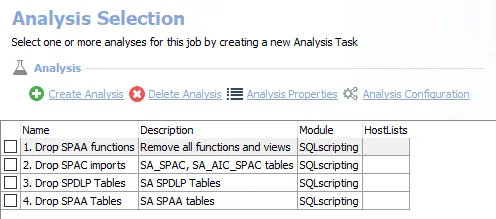
The default analysis tasks are:
- 1. Drop SPAA functions – Removes all functions and views from previous runs of the SharePoint Solution
- 2. Drop SPAC imports – Drops the SharePoint Activity Auditing tables imported from the previous runs
- 3. Drop SPDLP Tables – Drops the SharePoint Sensitive Data Discovery Auditing (SEEK) tables imported from the previous runs
- 4. Drop SPAA Tables – Drops the SharePoint Access Auditing tables imported from the previous runs
Don't try to run these tasks separately, since Netwrix designed them to work together. Follow these steps to run the analysis tasks:
Step 1 – In the Analysis Selection Pane, click Select All, which checks all tasks.
Step 2 – Right-click the SP_DropTables Job and select Run Job. The analysis execution status will be visible from the Running Jobs node.
Step 3 – When the job has completed, return to the Analysis Selection Pane and click Select All to deselect these analysis tasks.
Don't leave these analysis tasks checked to avoid accidental data loss.
The SP_DropTables Job drops all of these tables from the SQL Server database, and the data is no longer available.