SPAA: DLP Audit Settings
Use the DLP Audit Settings page to configure sensitive data discovery settings. It's a wizard page for the category of Scan For Sensitive Content.
Don't change scans in a way that results in returning less data on a subsequent scan (i.e. scanning fewer web applications, scanning fewer site collections, or a shallower depth scan). Access Analyzer marks resources not included in a subsequent scan as deleted in the Tier 2 database and later removes them from the Tier 1 database.
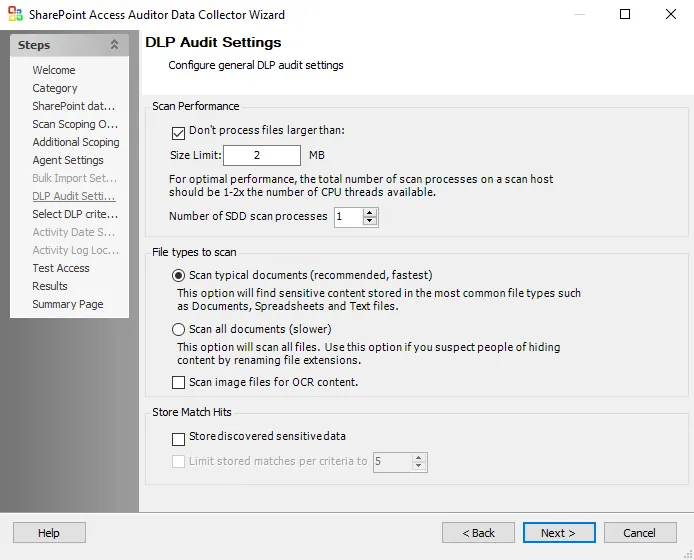
Configure the Scan Performance options:
- Don’t process files larger than: Size Limit [number] MB – Limits sensitive content scanning to files smaller than the specified size. The checkbox is selected by default. The default size is 2 MB.
- Number of SDD scan processes [number] – Increases the number of SDD scanner processes that spawn as part of a scan, increasing parallel scanning. The value shouldn't exceed 2x the number of CPU threads available.
Use the radio buttons to select the File types to scan:
-
Scan typical documents (recommended, fastest) – Scans most common file types
-
Scan all document types (slower) – Scans all file types except those excluded
-
Scan image files for OCR content – Use optical character recognition to scan image files for sensitive data content
noteUse the OCR option for clear scanned physical documents or documents directly converted to images, with standard fonts. It won't work for scanning photos of documents and may not recognize text on images of credit cards, driver's licenses, or other identity cards.
Use the checkboxes to select to Store Match Hits:
- Store discovered sensitive data – Stores match hits for sensitive data in the SPAA Tier 2 database. If you don't select this option, Access Analyzer still reports the match hits for sensitive data but masks the data columns in the database.
- Limit stored matches per criteria to [number] – Active only when you select the Store discovered sensitive data checkbox. Limits the number of stored matches per criteria to the specified number.