AWS: Sensitive Data Settings
Use the Sensitive Data Settings page to configure sensitive data discovery settings. It is a wizard page for the category of Collect SDD Data.
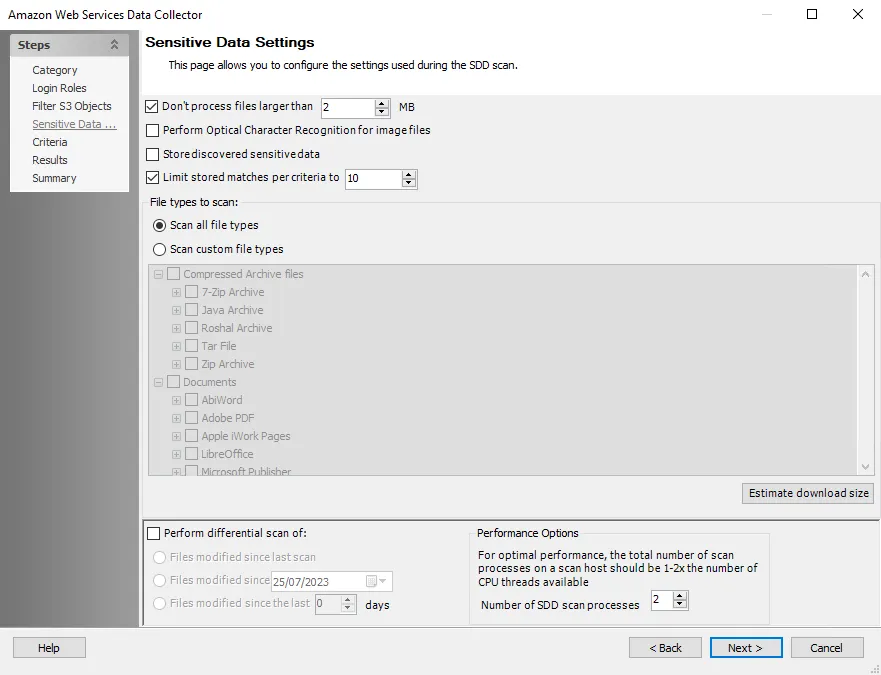
Configure the following options:
-
Don’t process files larger than: [number] MB – Limits the files to be scanned for sensitive content to only files smaller than the specified size
-
Include offline files (this may significantly increase scan times) – Includes offline files in the scan
-
Perform Optical Character Recognition for image files – Enables the data collector to scan for sensitive data within digital images of physical documents using optical character recognition (OCR)
noteThe OCR option is intended to work for clear scanned physical documents or documents directly converted to images, with standard fonts. It will not work for scanning photos of documents and may not be able to recognize text on images of credit cards, driver's licenses, or other identity cards.
-
Store discovered sensitive data – Stores discovered sensitive data in the database
-
Limit stored matches per criteria to [number] – Limits database storage of matches per criteria for discovered sensitive data
-
Use the radio buttons to select the File types to scan:
-
Scan all file types – Scans everything in a given environment
-
Scan custom file types – Select the checkboxes from the list of file and document types that are included in a sensitive data scan. The table contains the following categories and their sub-options:
- Compressed Archive files
- Documents
- Image files
- Presentations
- Spreadsheets
- Text/Markup files
-
-
Perform differential scan of – Choose whether to employ incremental scanning:
- Files modified since last scan – Scans only files modified since the last scan
- Files modified since [date] – Only scans files modified after the specified date
- Files modified since the last [number] days – Scans files modified within the specified number of days
-
Number of SDD scan processes [number] – Increases the number of Sensitive Data Discovery (SDD) scanner processes that spawn as part of a scan, increasing parallel scanning. The value shouldn't exceed 2x the number of CPU threads available.