ADInventory: Options
The Options page provides options for Active Directory data collection. It is a wizard page for the category of Scan Active Directory.
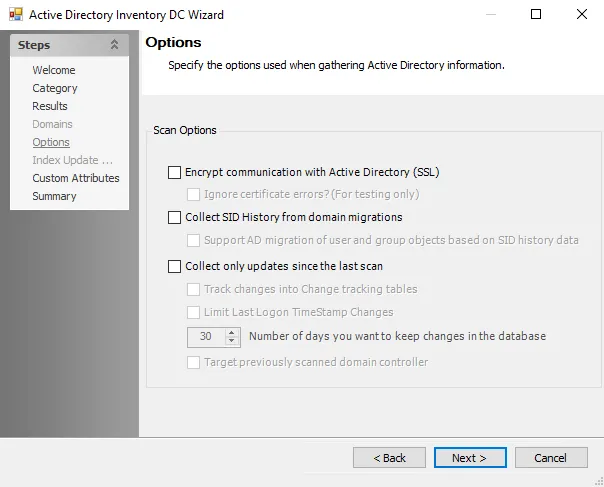
The Options page has the following configuration options:
-
Encrypt communication with Active Directory (SSL) – Allows the ADInventory Data Collector to communicate with Active Directory over a secure channel
- Ignore certificate errors? (For testing only) – Ignores untrusted certificate authority errors and allows the scan to continue. This option is for testing purposes only.
-
Collect SID History from domain migrations – During a domain migration, administrators create new infrastructure alongside the old infrastructure. The migration process typically adds the old account SID to the SID history attribute for the new account. The ADInventory Data Collector provides an option to collect SID history to help resolve SIDs for domain migrations.
-
Collect only updates since the last scan (recommended) – Default setting for differential scanning. The updates the scan collects include any changes to: group membership, attributes on user objects, attributes on group objects, and so on.
-
Track changes into Change tracking tables – Records all changes since the last scan in separate tables
-
Limit Last Logon TimeStamp Changes – When you select this option, the scan doesn't record changes to the Last Logon TimeStamp attribute
infoIf tracking changes, use the Limit Last Logon TimeStamp Changes option.
-
Number of days you want to keep changes in the database – Use the arrow buttons or manually enter a number to set the number of days to keep changes
-
Target previously scanned domain controller – Collects updated information from the last domain controller the scan targeted, to reduce scan time. Consider the following:
- If the last domain controller is unavailable, the targeted domain controller is the specified domain controller from the host list. If using the domain name, it attempts to find the last scanned domain controller.
- If the scan determines that domain controller is unavailable, it runs a full scan on the next domain controller that responds. Then, it will scan the new domain controller for changes.
Selecting the Track changes into Change tracking tables option enables the Number of days you want to keep changes in the database box. This tracks changes in Active Directory. When you enable change tracking, use notification analysis tasks to send alerts.
-