VBscripting Analysis Module
Use the VBscripting analysis module to access the VBScript Editor and apply VB scripting to the current analysis.
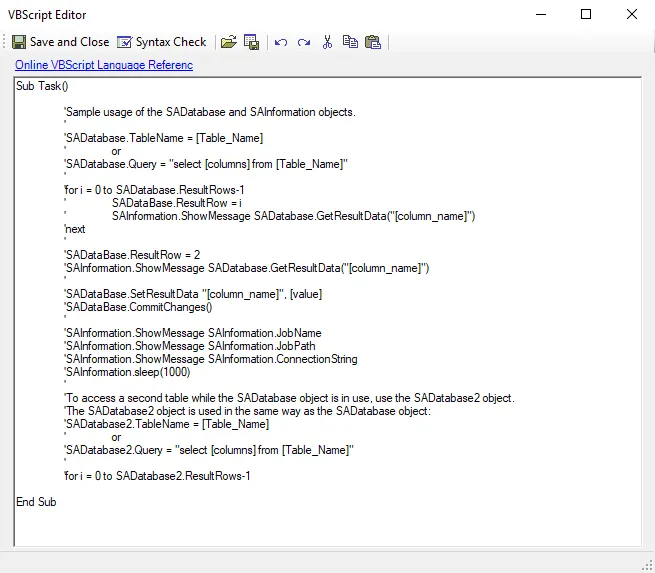
The VBScript Editor has the following options:
-
Save and Close – Saves the script and closes the window
-
Syntax Check – Checks VB script syntax
- Syntax Check doesn't identify logic errors, only instances where syntax is incorrect. Click Syntax Check to open the Script Errors window which identifies syntax errors.
- Syntax Check reports syntax errors starting from the beginning of the script to the end. Syntax Check doesn't return a list of errors.
-
Load file – Opens a File Explorer to navigate to a VBS file
-
Save to File – Saves the configured script into a VBS file
-
Undo – Undo the previous changes made to script (Ctrl+Z)
-
Redo – Redo the previous changes made to script (Ctrl+Y)
-
Cut – Cuts the highlighted script from the VB script editor (Ctrl+X)
-
Copy – Copies the highlighted script in the VB script editor (Ctrl+C)
-
Paste – Pastes cut or copied script into the VB script editor (Ctrl+V)
When done using the editor, click Save and Close to return to the Analysis Properties page. Make sure to save the analysis.