ServiceNow Action Module
The ServiceNow Action Module automates the creation of ServiceNow incidents from data collected by the Netwrix suite of data security tools. By facilitating communication between tools like Access Analyzer and ServiceNow’s incident management capability, the module doesn't just identify security risks in an organization’s environment — it presents them to admins, managers, and other stakeholders in a familiar way, following the chains of command and approval that employee relationships and business workflows define in ServiceNow.
When account lockouts occur, the Active Directory Inventory Data Collector makes that information available. From the Access Analyzer console, the ServiceNow Action Module transmits customized information regarding the locked out accounts directly to those responsible for account management, alerting them of the issue and requesting that they take appropriate action to re-enable user accounts before affected users become aware of the problem.
This section describes the following pages in the configuration wizard.
Dependencies
The ServiceNow Action Module requires an active ServiceNow account with:
- Import Multiple Web Service Plugin
- Web Service Import Sets
- System Web Service plugins enabled
- An instance of Access Analyzer with the Stealthbits ServiceNow Action Module enabled
Permissions
The following permissions are required to use Access Analyzer’s ServiceNow Action Module:
- ServiceNow admin account – An Administrator Role by an organization’s ServiceNow administrator
- You can configure the Settings > ServiceNow node at the global level with a credential provisioned to create incidents as Callers in the Assigned to field, and any other ServiceNow incident field that references the sys_user table.
Connecting ServiceNow
You can perform the following instructions only with a ServiceNow admin account and access to the ServiceNow Action Module XML file.
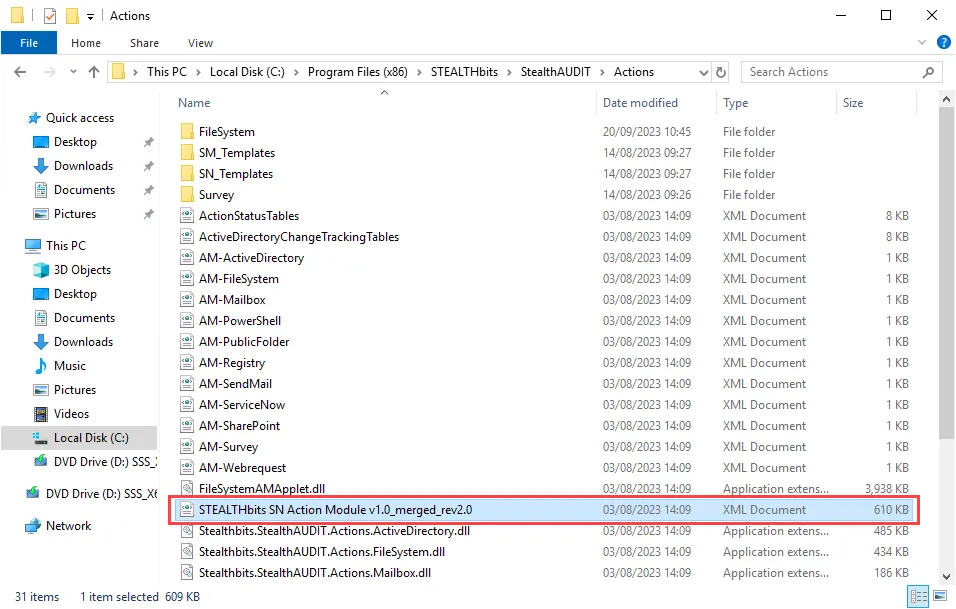
Step 1 – Navigate to the file path …\STEALTHbits\StealthAUDIT\Actions to access the
STEALTHbits SN Action Module v1.0_merged_rev2.0 file to use on ServiceNow’s website.
Step 2 – Visit servicenow.com, sign into the administrator account, expand System Update Sets, and click Retrieved Update Sets.
Step 3 – Under Related Links, click Import Update Set from XML.
Step 4 – Attach the STEALTHbits SN Action Module v1.0_merged_rev2.0 file, and then click
Upload.
Step 5 – After you upload the file, click the STEALTHbits SN Action Module within the list of updated sets.
Step 6 – Click the Preview Update Set button. Wait until the update set preview completes, then click Commit Update Set. Then, close the Update Set Commit window.
Step 7 – On the navigation page, expand System Definitions and click Plugins. Then click on the Insert Multiple Web Service plugin
Step 8 – Under Related Links, click Activate/Upgrade and click Activate on the Activate Plugin window. When the Activation is complete, click Close to close the window.
Step 9 – Click Reload on the System Plugin page and confirm the Status is Active.
Access Analyzer is now connected with the ServiceNow platform.
Source Table Configuration
Individual action modules, including the ServiceNow Action Module, may have their own column requirements. To take action on a resource, the source table must contain columns with RowGUID values to uniquely identify them.
Configuration
The ServiceNow Action module is configured through the ServiceNow Action Module Wizard, which contains the following wizard pages:
- Welcome
- ServiceNow Action: Authentication
- ServiceNow Action: Incident Creation
- ServiceNow Action: Description
- ServiceNow Action: Summary
Not all pages may be accessible unless the user has a configured ServiceNow account.
The Welcome page displays first in the ServiceNow Action Module Wizard. Review the introductory and caution information about the ServiceNow Action Module.
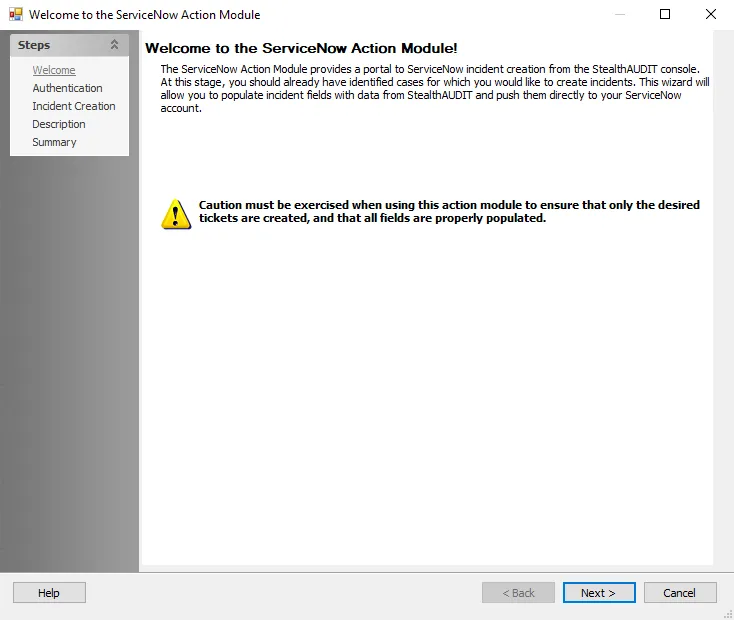
To proceed, click Next or use the Steps navigation pane to open another page in the wizard.