File System Action: Target
Use the Target page to point the action module towards a file path on the specified host. You can use environmental variables (for example, Program Files, SystemRoot, SAInstallDir, and so on) when creating a path, as well as fields in the raw table output, to populate the Target items field.
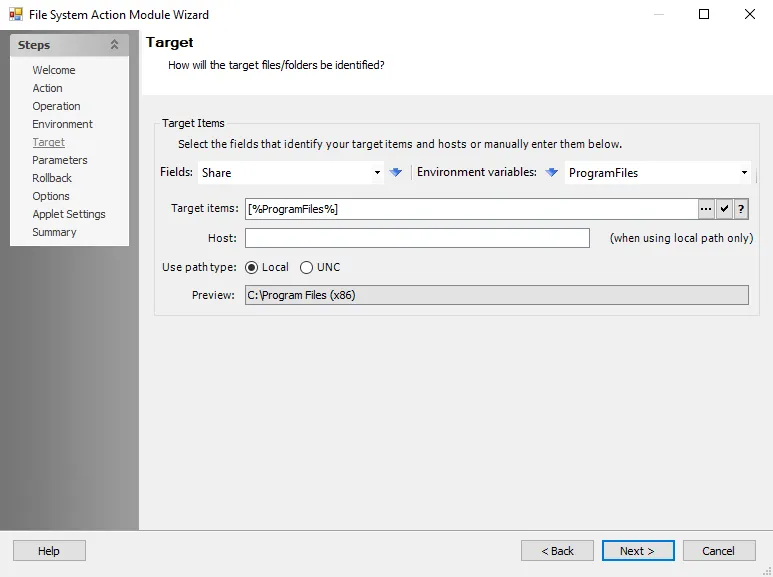
Use the fields provided to select target items and hosts from the dropdown lists and populate the Target items field, or edit the field manually. The Preview field updates based on the contents of the Target items field.
-
Fields – Use the dropdown list to select a field (column) from the source table, then click the blue arrow to insert the item into the Target items field
-
Environment Variables – Select an item from the dropdown list, then click the blue arrow to insert the item into the Target items field
-
Target items – Enter the path to the target file or folder
- Click the ellipsis (…) to browse for pattern path specification
- Click the tick icon to show a preview of the specified path
- Click the Help icon for additional information
-
Host – Select the field that identifies the systems or manually enter the host to take action against
-
Use path type – Choose from the following options:
- Local – Uses the local path
- UNC – Uses the UNC path
-
Preview – Shows what the specified compound path resolves to. The text here initializes the file specification selection dialog.