File System Action Module
The File System Action Module lets Access Analyzer administrators automate remediating and modifying Windows file system attributes and properties. The File System Action Module provides options for changing attributes and permissions, as well as copying, deleting, moving, and renaming file system contents. It is available with a special Access Analyzer license.
Be careful when using this Action Module. Apply only the required changes, and only to the target systems you want to change. Actions perform their functions on all rows in a table.
Access Analyzer action modules contain one or more selectable operations. Each operation performs its function on a single object per row from the source table defined in the action.
Permissions
The File System Action Module requires a Access Analyzer connection profile and privileged access to file system devices. You can configure the Access Analyzer connection profile to use a Task account type. The following are the least privileged access model required for Share Permission Changes:
-
Windows – User credential must be member of Power Users group
-
NetApp Data ONTAP 7-Mode Device – User credential must be member of Power Users group
-
NetApp Data ONTAP Cluster-Mode Device – User credential must have role on SVM that has permission to modify share permissions
noteEnter the following syntax to create role:
‑security login role create ‑role [DESIRED_ROLE_NAME] ‑cmddirname “vserver cifs share access-control” ‑vserver [VSERVER_NAME] ‑access allReplace the
[DESIRED_ROLE_NAME]and[VSERVER_NAME]variables with the required information. For example:‑security login role create ‑role netwrix ‑cmddirname “vserver cifs share access-control” ‑vserver testserver ‑access all
Applet Deployment
The File System Action Module deploys an applet the first time you run an action. The module
installs applets within the Access Analyzer Installation Directory if the %SAInstallDir%
environment variable is present. Otherwise, it deploys applets to
C:\Program Files (x86)\STEALTHbits\StealthAUDIT.
Source Table Configuration
Individual action modules, including File System Action Module, may have their own column requirements. To take action on a file system resource, the source table must contain a column with values to uniquely identify it. File System resources correspond to rows in a Access Analyzer table. File System attributes correspond to columns. After scoping the source table, use the Target page to specify the field that identifies the target attribute along with any environmental variables.
The File System Action Module requires these columns. Otherwise, errors may occur when you run the action, affecting analysis and reports downstream.
| Required Columns | Description |
|---|---|
| rowGUID | Identifies each data row as unique. The datatype in the table is uniqueidentifier (GUID). |
| RowKey | Identifies each data row as unique. Sometimes the value is a GUID, but the datatype in the table is a varchar (text string). |
Remember, individual File System actions may have their own column requirements in addition to the columns listed here. The File System Action Module wizard makes these columns available.
The Operations page lists the operations that the File System Action Module can perform. Each operation has its own source table column requirements as follows:
| Operation | Column requirements |
|---|---|
| Change attributes | Columns containing:
|
| Change permissions and Auditing | Columns containing:
|
| Change permission inheritance | Columns containing:
|
| Change Share permissions | Columns containing:
|
| Copy | Columns containing:
|
| Delete | Columns containing:
|
| Launch Remote Process | No specific columns required |
| Move | Columns containing:
|
| Remove permissions | Columns containing:
|
| Remove Share permissions | Columns containing:
|
| Rename | Columns containing:
|
| Add tags | Columns containing:
|
| Remove tags | Columns containing:
|
| Change Owner | Columns containing:
|
Configuration
The File System Action module is configured through the File System Action Module Wizard, which contains the following wizard pages:
Depending on the selections on the various pages, not all pages may be accessible.
- Welcome
- File System Action: Action
- File System Action: Operation
- File System Action: Prior Actions
- File System Action: Environment
- File System Action: Target
- File System Action: Parameters
- File System Action: Destination
- File System Action: Rollback
- File System Action: Options
- File System Action: Applet Settings
- File System Action: Summary
The Welcome page displays first and gives an overview of the action module. The navigation pane contains links to the pages in the wizard, which may change based on the Action selected on the Action page.
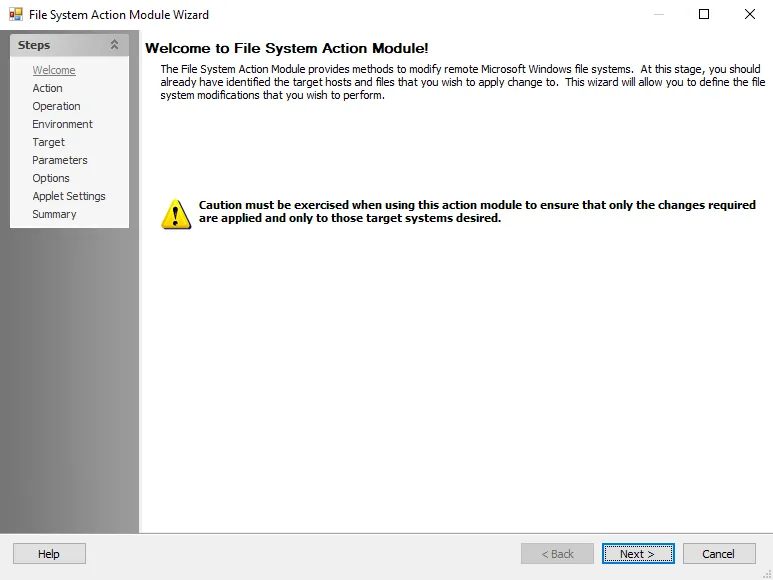
To proceed, click Next or use the Steps navigation pane to open another page in the wizard.