0-FS_Nasuni Job
You need the 0-FS_Nasuni job to target Nasuni Edge Appliances. The job can be added from the Enterprise Auditor Instant Job Library. See the Instant Job Wizard topic to add this instant job to the 0.Collection job group.
After you add the job to the 0.Collection job group, rename it from FS_Nasuni to 0-FS_Nasuni so it runs immediately after the 0-Create Schema job.
Assign the 0-FS_Nasuni job a custom host list containing all on-premise Nasuni Edge Appliances and cloud filers, and a custom Connection Profile containing the API Access Key and Passcode for each on-premise Nasuni Edge Appliance and cloud filer in the target environment. Nasuni API key names are case sensitive. When providing them, ensure they are entered in the exact same case as generated.
Queries for the 0-FS_Nasuni Job
The queries for the 0-FS_Nasuni job use the PowerShell Data collector to gather system information, volume data, and share data from the Nasuni environment.
Don't modify the queries. The queries are preconfigured for this job.
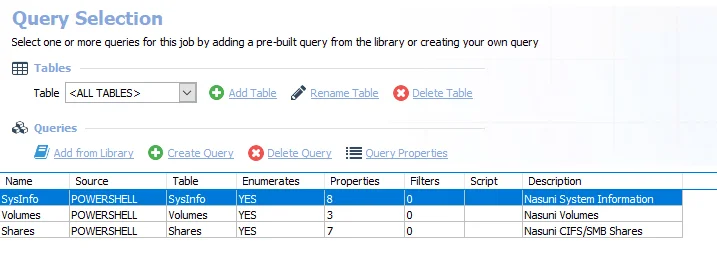
The queries for the 0-FS_Nasuni job are:
- SysInfo – Collects Nasuni system information
- Volumes – Collects Nasuni volume information
- Shares – Collects Nasuni CIFS/SMB share information