Exchange Solution
The Exchange Solution provides auditing and reporting on multiple aspects of the Exchange environment to assist with identifying risk, understanding usage, and decreasing bloat. Areas of focus include Audit and Compliance; Maintenance and Cleanup; Metrics and Capacity; Operations and Health; and Public Folders and Configuration Baseline. Sensitive Data Discovery searches mailboxes and public folders to discover where sensitive information of any type exists. This requires the Sensitive Data Discovery Add-on.
Supported Platforms
-
Exchange Online (Limited)
-
Exchange 2019 (Limited)
-
Exchange 2016 (Limited)
-
Exchange 2013
-
Exchange 2010 (Limited)
See the Exchange Support and Permissions Explained topic for additional information.
Requirements, Permissions, and Ports
See the Target Exchange Servers Requirements, Permissions, and Ports and Target Exchange Online Requirements, Permissions, and Ports topics for additional information.
Sensitive Data Discovery Considerations
Install the Sensitive Data Discovery Add-On on the Enterprise Auditor Console server to enable Sensitive Data criteria for scans. If you run Sensitive Data Discovery (SDD) scans, increase the minimum amount of RAM. Each thread requires a minimum of 2 additional GB of RAM per host. For example, if the job scans 8 hosts at a time, it requires an extra 16 GB of RAM (8 x 2 = 16).
The Sensitive Data Discovery Add-on installation package installs the appropriate JDK (Java) version on the server. This JDK requires no configuration, works with Enterprise Auditor by default, and doesn't conflict with other JDKs or Java Runtimes in the same environment. Don't customize it through Java.
Location
The Exchange Solution requires a special Enterprise Auditor license. You can install it from the Enterprise Auditor Instant Job Wizard. After you install it into the Jobs tree, navigate to the solution: Jobs > Exchange.
Each job group within the solution collects data, analyzes the data, and reports on the target Exchange environment, except for the 6. Distribution Lists job group that only analyzes data and generates reports. The EX_UserOverview job runs analysis on the collected data and generates reports.
Job Groups
The Exchange Solution groups jobs into categories based on what they audit.
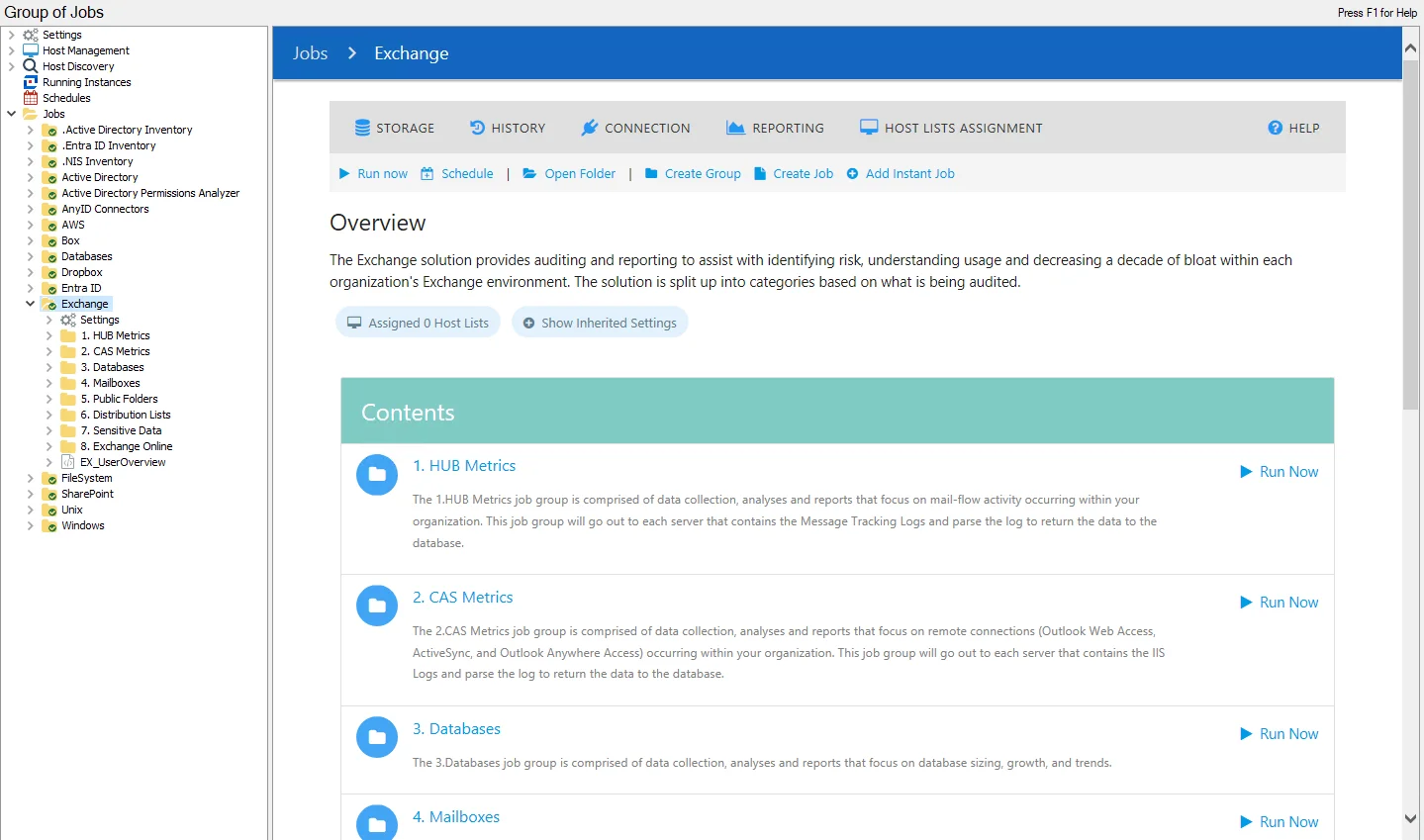
The following job groups comprise the Exchange Solution:
-
1.HUB Metrics Job Group – Comprised of data collection, analysis, and reports that focus on mail-flow activity occurring within your organization. This job group goes out to each server that contains the Message Tracking Logs and parses the log to return the data to the Enterprise Auditor database.
-
2.CAS Metrics Job Group – Comprised of data collection, analysis, and reports that focus on remote connections (Outlook Web Access, ActiveSync, and Outlook Anywhere Access) occurring within your organization. This job group goes out to each server that contains the IIS Logs and parses the log to return the data to the Enterprise Auditor database.
-
3.Databases Job Group – Comprised of data collection, analysis, and reports that focus on database sizing, growth, and trends
-
4.Mailboxes Job Group – Comprised of data collection, analyses, and reports around mailbox features, logons, permissions, and sizing
warningDon't run this job group at this job group level.
- See the Recommended Configurations for the 4. Mailboxes Job Group topic for this job group. All jobs within this group are compatible with the Office 365 environment.
-
5. Public Folders Job Group – Comprised of data collection, analysis, and reports that focus on public folder sizing, content aging, entitlement, ownership, and the identification of each public folder’s Most Probable Owner. The Most Probable Owner is determined by a unique algorithm built into the public folder data collector, based on folder ownership, content posted, and size of content posted.
-
6. Distribution Lists Job Group – Lists the direct and effective membership to distribution lists in addition to providing context around potentially stale distribution lists
-
7.Sensitive Data Job Group – Comprised of jobs which locate sensitive data found in mailboxes and public folders in the Exchange environment
-
8.Exchange Online Job Group – Comprised of jobs that locate sensitive data found in mailboxes and public folders in the Exchange environment
-
EX_UserOverview Job – provides correlation from multiple data collection points to show information for each user about their mailbox size, mailbox access rights, mail-flow metrics and remote connectivity to the Exchange environment. These reports provide user impact analysis on the environment. This job depends upon multiple job groups.
The MAPI-based data collectors require both Enterprise Auditor MAPI CDO and Microsoft Exchange MAPI CDO on the Enterprise Auditor Console server. After you install them, configure the Settings > Exchange node for proper connection to the Exchange server. See the Exchange topic for additional information.