EX_Mailflow_DL Job
The EX_Mailflow_DL job provides information around distribution list usage.
Analysis Tasks for the EX_Mailflow_DL Job
View the analysis tasks by navigating to the Exchange > 8. Exchange Online > EX_Mailflow_DL > Configure node and select Analysis.
warning
Don't modify or deselect the selected analysis tasks. The analysis tasks are preconfigured for this job.
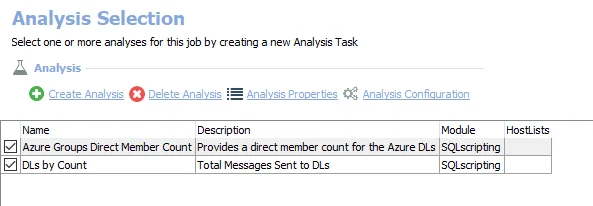
The following analysis tasks are selected by default:
- Azure Groups Direct Member Count – Creates the EX_MailFlow_DL_AzureMemberCount table, accessible under the job’s Results node. Provides a direct member count for distribution lists from Azure groups.
- DLs by Count – Creates the EX_Mailflow_DLsByCount table, accessible under the job’s Results node. Lists of all distribution lists and how much mail-flow they have received.
In addition to the tables and views created by the analysis tasks, the EX_Mailflow_DL Job produces the following pre-configured report:
| Report | Description | Default Tags | Report Elements |
|---|---|---|---|
| Top DLs by Received Count | The top distribution lists by total messages received. | None | This report is comprised of two elements:
|