EX_StaleGroups Job
The EX_StaleGroups job identifies potentially stale distribution groups based on the last domain logon of the members. These groups should be reviewed and cleaned up.
Analysis Tasks for the EX_StaleGroups Job
View the analysis tasks by navigating to the Exchange > 6. Distribution Lists > Membership Analysis > EX_StaleGroups > Configure node and select Analysis.
warning
Don't modify or deselect the selected analysis tasks. The analysis tasks are preconfigured for this job.
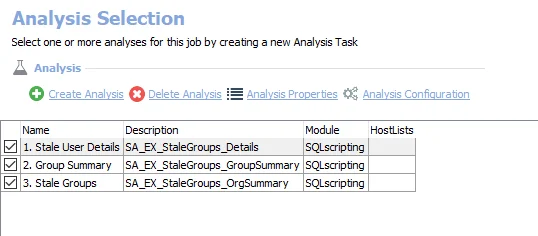
The following analysis tasks are selected by default:
- 1. Stale User Details – Creates the SA_EX_StaleGroups_Details table, accessible under the job’s Results node
- 2. Group Summary – Creates the SA_EX_StaleGroups_GroupSummary table, accessible under the job’s Results node
- 3. Stale Groups – Creates an interim processing table in the database, for use by downstream analysis and report generations