0.Collection Job Group
The Dropbox > 0.Collection job group scans the targeted Dropbox site using the DropboxAccess Data Collector. The collected data is then available to other job groups in the Dropbox solution and the Access Information Center for analysis.
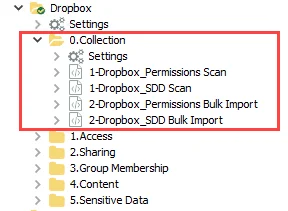
The 0.Collection job group is comprised of:
- 1-Dropbox_Permissions Scan Job – This job scans the target Dropbox site
- 1-Dropbox_SDD Scan Job – This job scans sensitive data in the target Dropbox site. The Sensitive Data Discovery Add-On is required to run this job. This data also populates the Dropbox sensitive data Discovery Reports in the Access Information Center. See the Resource Audits Overview topic in the Netwrix Access Information Center Documentation for additional information.
- 2-Dropbox_Permissions Bulk Import Job – This job imports the collected data into the Enterprise Auditor database
- 2-Dropbox_SDD Bulk Import Job – This job imports the collected sensitive data into the Enterprise Auditor database. The Sensitive Data Discovery Add-On is required to run this job. This data also populates the Dropbox sensitive data Discovery Reports in the Access Information Center. See the Resource Audits Overview topic in the Netwrix Access Information Center Documentation for additional information.
The relationship between the scan and bulk import jobs requires the following considerations:
- You must follow a scan job run from an Enterprise Auditor Console with the corresponding bulk import job from the same Enterprise Auditor Console version
- You can't run two scan jobs processing the same information, for example two 1-Dropbox_Permissions Scan jobs, consecutively against the same target host. You must run the corresponding bulk import job, for example the 2-Dropbox_Permissions Bulk Import job, in between.
- For the Dropbox Solution, the bulk import jobs require the same connection profile as used in the corresponding scan jobs
info
When running the sensitive data jobs, disable the permissions jobs, and vice versa.
tip
Remember, before running the Dropbox Solution for the first time, generate an access token to be used in the Connection Profile. You only need to do this once. See the Configure the Dropbox Access Query topic for additional information.