AD_DSRMSettings Job
The AD_DSRMSettings Job provides details on domain controller registry settings for the DSRMAdminLogonBehavior key. If this key is set to 1 or 2, you can use the Directory Services Restore Mode (DSRM) Admin Account to log in to the domain controller even if it has not been started in DSRM, which can present a potential security vulnerability. Additional information on this registry key is available in this Microsoft Document.
Analysis Tasks for the AD_DSRMSettings Job
Navigate to the Active Directory > 5.Domains > AD_DSRMSettings > Configure node and select Analysis to view the analysis tasks.
Don't modify or deselect the selected analysis tasks. The analysis tasks are preconfigured for this job.
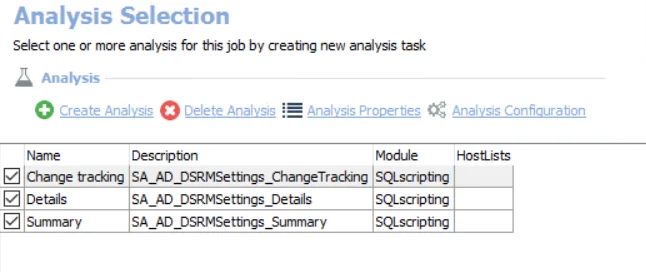
The default analysis tasks are:
- Change tracking – Creates the SA_AD_DSRMSettings_ChangeTracking table accessible under the job’s Results node
- Details – Creates the SA_AD_DSRMSettings_Details table accessible under the job’s Results node
- Summary – Creates the SA_AD_DSRMSettings_Summary table accessible under the job’s Results node
In addition to the tables and views created by the analysis tasks, the AD_DSRMSettings Job produces the following pre-configured report:
| Report | Description | Default Tags | Report Elements |
|---|---|---|---|
| DSRM Admin Security | This report highlights domain controller registry settings for the DSRMAdminLogonBehavior key. If this key is set to 1 or 2, you can use the DSRM Admin account to log in to the domain controller even if it has not been started in DSRM. This is a potential vulnerability. See the Microsoft Restartable AD DS Step-by-Step Guide for additional information. | None | This report is comprised of two elements:
|