Reports via the Web Console
The Web Console is where you can view any reports that Enterprise Auditor has published, outside of the Enterprise Auditor Console.
- Web Console – This console uses an embedded website for published reports. It provides a consolidated logon feature for viewing published reports, and accessing the Netwrix Access Information Center (when installed) and other Netwrix products.
The Enterprise Auditor installer places a Web folder at the root of the Enterprise Auditor directory. This folder contains the Enterprise Auditor Web Server (WebServer.exe) that runs on the Enterprise Auditor Console upon installation.
The Enterprise Auditor Web Server service must run as an account that has access to the Enterprise Auditor database. This may be a different account than the one used to connect Enterprise Auditor to the database. If the Enterprise Auditor Vault service is running, the account running the Web Server service must be an Enterprise Auditor Administrator. See the Vault topic for additional information.
The Web folder that the Enterprise Auditor installer places at the root of the Enterprise Auditor
directory also contains a WebServer.exe.config file. This file contains configurable parameters.
If encryption methods have been configured for Kerberos on the Enterprise Auditor server but not on the service account running the Enterprise Auditor Web Server service, then users will not be able to log-in to the Web Console and will receive an error message. See the Manage Kerberos Encryption Warning for the Web Console topic for additional information on configuring security polices to allow Kerberos encryption.
Log into the Web Console
To log into the Web Console, a user's account must have the User Principal
Name (UPN) attribute populated within Active Directory. Then the user can login using domain
credentials. If the Netwrix Access Information Center manages multiple domains,
the username needs to be in the domain\username format.
You can manage access to reports in the Web Console through the Role Based Access feature of Enterprise Auditor (Settings > Access). The Web Administrator role and the Report Viewer role grant access to the published reports. See the Role Based Access topic for addition information.
You control access to the AIC and other Netwrix products from within those products.
You can configure the address to the Web Console within the Enterprise Auditor Console
(Settings > Reporting). The default address is http://[hostname.domain.com]:8082. From the
Enterprise Auditor Console server, you can access it at http://localhost/ with any standard
browser. To access the Web Console from another machine in or connected to the environment, replace
localhost with the name of the Enterprise Auditor Console. See the
Update Website URLs
topic for additional information.
Any browser used to access the Web Console must have JavaScript allowed for the site. See the Configure JavaScript Settings for the Web Console topic for additional information.
To log in to the Web Console:
Step 1 – To open the Web Console page, use one of the following methods:
- From the Enterprise Auditor Console server – Click the Published Reports desktop icon
(
http://localhost:8082) - For remote access – Enter one of the following URLs into a web browser:
http://[machinename]:8082https://[machinename]:8082
You may need to add the URL you use to the browser’s list of trusted sites.

Step 2 – Enter your User Name and Password. Click Login.
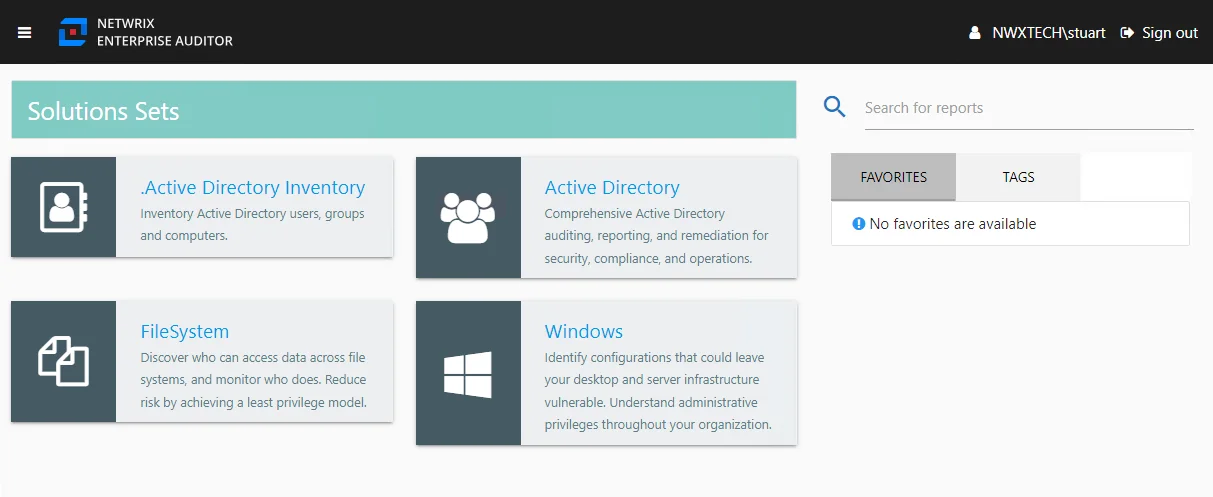
The home page shows the solutions with published reports available. See the Web Console topic for information on using the Web Console.