Enable Multiple Domain Access
When the AuthenticationDomains parameter in the WebServer.exe.config file is blank, only
domain users from the domain where the Enterprise Auditor Console resides can access the Web
Console. You can grant access from other domains by specifying them within this parameter.
After adding another domain, also add the domain where the Enterprise Auditor Console resides.
All domains provided or enumerated must have a trust relationship with the domain where Enterprise Auditor resides. To allow access to the Web Console from other domains:
Step 1 – Open the WebServer.exe.config file with a text editor, for example Notepad. It is located within the Web folder of the Enterprise Auditor installation directory.
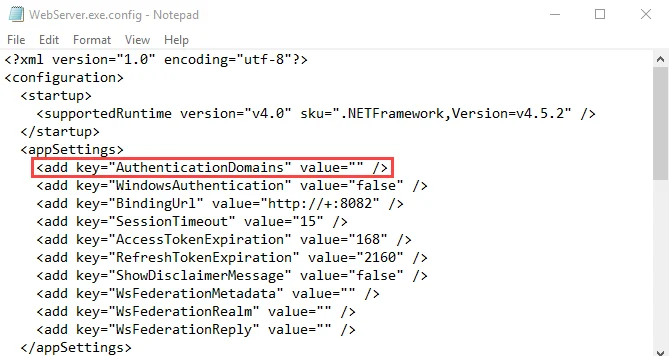
Step 2 – Add the domains you want to the value for the AuthenticationDomains parameter:
<add key="AuthenticationDomains" value="" />
Use domain name in a comma-separated list. For example:
<add key="AuthenticationDomains" value="Sherwood.com, Nottingham.com" />
Step 3 – Save and close the file.
Step 4 – Navigate to Services (services.msc). Restart the Enterprise Auditor Web Server
service.
You can now access the Web Console from multiple domains.
To allow access to the AIC from these domains, you must also configure this for the AIC. See the Multiple Domains topic in the Netwrix Access Information Center Documentation for additional information.