Active Directory Account for User Credentials
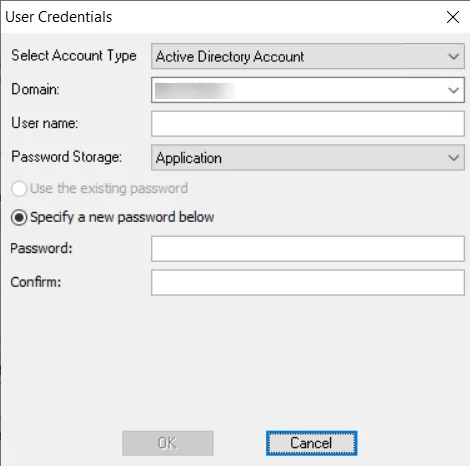
If the account type selected on the User Credentials window is Active Directory Account, the following information is required for the credential:
-
Domain – dropdown menu with available trusted domains will appear. Either enter the short domain name in the textbox or select a domain from the menu.
-
User name – Enter the user name
-
Password Storage – Choose the option for credential password storage:
- Application – Uses the configured Profile Security setting as selected at the Settings > Application node. See the Application topic for additional information.
- CyberArk – Uses the CyberArk Enterprise Password Vault. See the CyberArk Integration topic for additional information. The password fields don't apply for CyberArk password storage.
- Managed Service Account – Use previously configured MSA and gMSAs for authentication. The password fields aren't applicable when this option is selected. See the Group Managed Service Accounts (gMSA) Configuration topic for additional information.
-
Password – Enter the password
-
Confirm – Re-enter the password