Layout Page
Use the Layout page to configure the layout of the report's content.
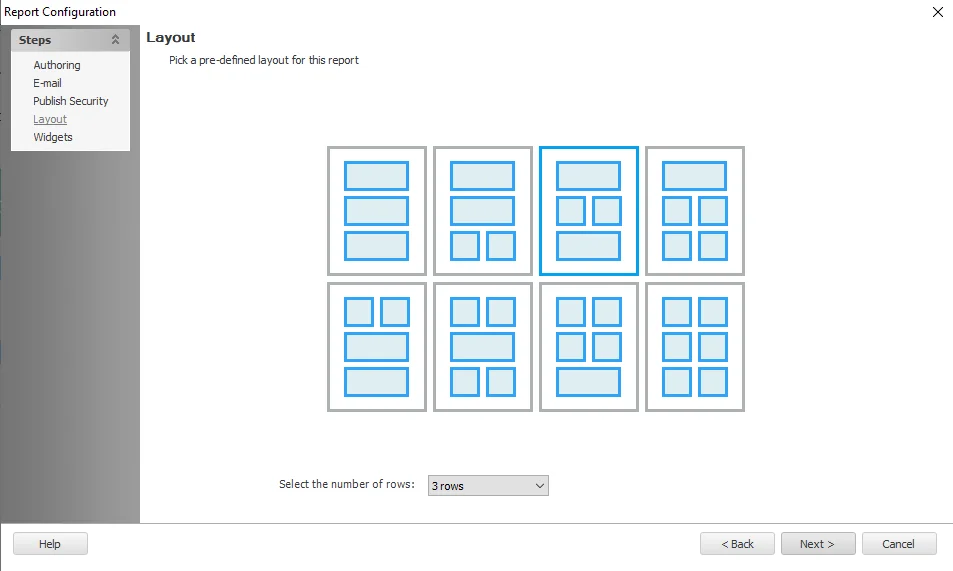
To select the layout:
Step 1 – Click the Select the number of rows dropdown menu and select an option from: 1 row, 2 rows, or 3 rows.
Step 2 – Click the layout tile you want for the report.
You've selected the layout for the report. Each box on the selected tile corresponds to a separate widget that you next need to configure on the Widgets Page page of the Report Configuration wizard.
Element Downgrade Editor
If you are editing an existing report and you select a layout that has fewer elements than the number of already configured widgets, then the Element Downgrade Editor automatically displays.

The top of the editor specifies the maximum number of elements allowed by the correctly selected layout. Select the checkboxes next to the title of all the configured widgets you want to keep up to this limit, then click OK. Enterprise Auditor removes any widgets you don't select from the report.
You can click Cancel to return to the layout page to select a different layout with more elements.