Report Roles Tab
The Report Roles tab is part of the Role Bases Access feature of Enterprise Auditor. If you enable Role Based Access, the table displays all accounts that can view reports within the Web Console. If you haven't enabled Role Based Access, all accounts have access to all reports, and the table is blank. See the Role Based Access topic for additional information.
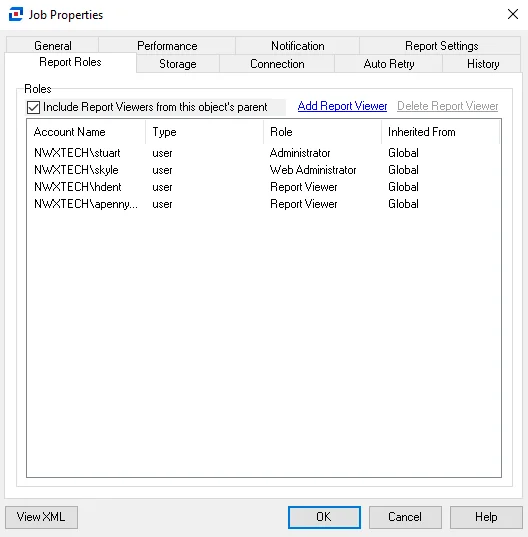
On the Report Roles tab, you can't break report role inheritance. Reports inherit access from the global level to job groups to jobs to report configuration. All reports inherit the user roles configured at the global level (Settings > Roles). Only the Global Options Administrator, the Access Administrator, and the Host Management Administrator don't have access to reports.
You can uncheck the Include Report Viewers from this object's parent option to automatically remove any user with the Report Viewer role inherited from a parent object to the job. Remember, this doesn't apply to global inheritance.
You can add additional accounts with the Report Viewer role at the job level. Enterprise Auditor inherits their access down to all reports generated by the job. Click Add Report Viewer to open the Select User or Group window and grant a new account access to these reports. You can break inheritance for accounts that haven't inherited the report role from the global level. Select an account and click Delete Report Viewer to deny access to the reports.
The table displays the following information:
- Account Name – NT Style account name
- Type – Account type (user or group)
- Role – Role assigned to account which grants access to reports
- Inherited From – Indicates the level at which the account was granted access to reports. Remember, you can't break global inheritance.
Click OK to save configuration changes and close the Job Properties window. Click Cancel if you didn't make changes.