Job Properties
You can configure jobs to inherit global settings down through parent job groups or configure them individually at the job level through the Job Properties window.
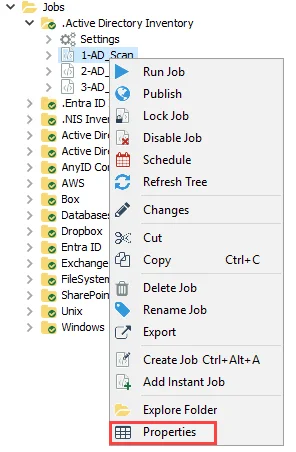
To configure a job’s properties, open the Job Properties window by right-clicking on the job's node in the Navigation pane and selecting Properties.
You can configure the properties at the job level within the Job Properties window using the following tabs:
- General Tab
- Performance Tab
- Notification Tab
- Report Settings Tab
- Report Roles Tab
- Storage Tab
- Connection Tab
- Auto Retry Tab
- History Tab
You can click the View XML button at the bottom of the window to open the job’s XML file. See the View Job XML File for additional information.
Click OK to save configuration changes and close the Job Properties window. Click Cancel if you didn't make changes.