Configure Node
You create changes to configurations for the job’s assigned Host Lists, Queries, Analyses, Actions, and Reports through the [Job] > Configure node or through the Configure shortcut on the job’s Description page.
 |  |
| Configure Node | Configure link on job description page |
The sub-nodes under the [Job] > Configure node are:
- Hosts Node – Assign a host list at the job level or manually add hosts for the job to target
- Queries Node – Select and configure a Enterprise Auditor data collector to scan targeted hosts
- Analysis Node – Create and configure Analysis and Notification tasks for collected data
- Actions Node – Create and configure Action tasks for taking action on collected and analyzed data
- Reports Node – Create and configure Reports to generate during job execution
Configure Page
The job's Configure Page provides an overview with shortcuts for options you configure in the job's Configure Node.
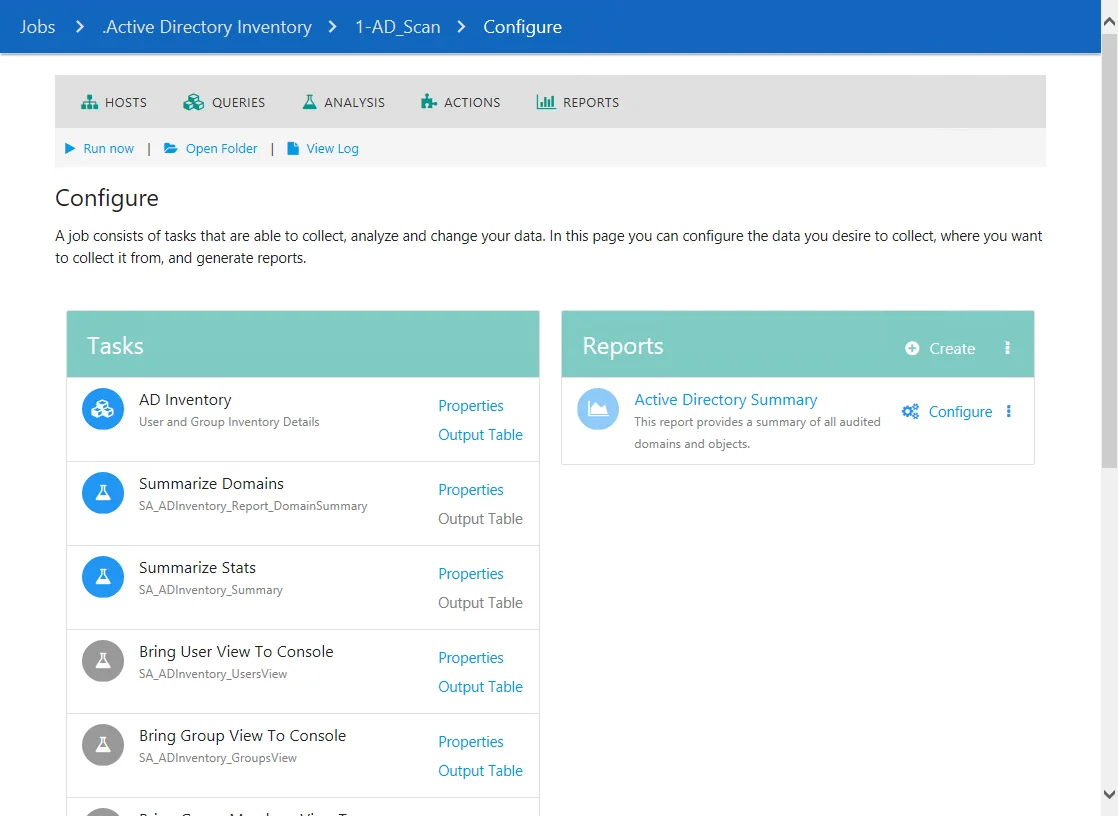
The options on the Configure Page are:
- Hosts - Navigates to the job's Hosts node
- Queries - Navigates to the job's Queries node
- Analysis - Navigates to the Analysis node
- Actions - Navigates to the Actions node
- Reports - Navigates to the Reports node
- Run Now - Executes the job
- Open Folder - Opens the job folder location with supporting files in the Windows Explorer
- View Log - Opens the job’s log
The options in the Configure section are:
-
Tasks - If applicable, displays a list of the job's Queries, Analysis Tasks, and Action Modules
- Click Properties to view the task's properties
- Click Output Table to view the Results for the task under the Results Node
-
Hosts - Lists the assigned hosts for the job
-
Reports - If applicable, displays a list of the job's Reports
- Click the reports name to access a report under the job's Results Node
- Click Configure to edit the report parameters in the Report Configuration Wizard