Hosts Node
The Hosts node provides the option to assign a preconfigured host list at the job level. It also provides a way to manually assign hosts for the job to target using Host Selection pane.
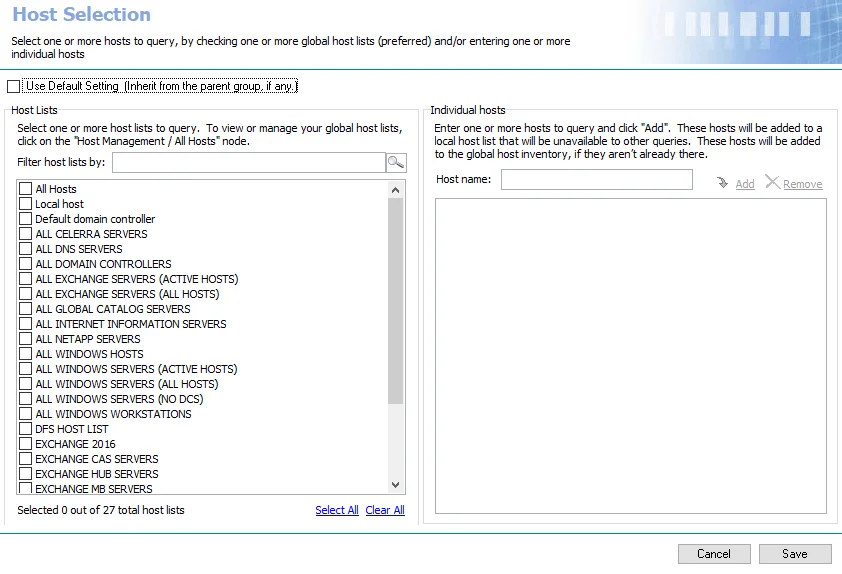
Use the default settings by selecting the Use Default Setting checkbox and inherit the job group’s assigned host lists. To break inheritance and assign host lists at the job level select from the available host lists.
Hosts added manually at the job level are added to the Master Host Table if not already there, and it triggers a host inventory query according to the global settings. The host will not be added to any individual host lists. See the Manually Add Hosts to a Job topic for additional information.
Click Save to apply any changes to the host selection. Changes aren't implemented unless you save them.
Manually Add Hosts to a Job
You can manually add hosts at the job level even when inheritance (Use Default Setting) is used for host list assignment. The job targets the hosts in any assigned host lists as well as any manually added at the job level. Follow these directions to manually add a host to a job.

Step 1 – Navigate to the job’s Configure > Hosts node.
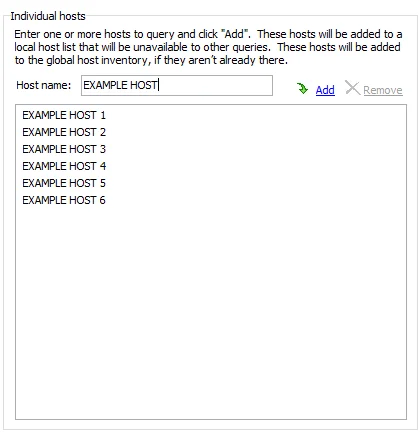
Step 2 – In the Individual hosts section of the Host Selection view, enter the Host name in the textbox and click Add.
Step 3 – Repeat the previous step for each host to add.
Step 4 – Click Save and then OK to confirm the changes.
The job now targets the manually added host.