Host Discovery Wizard
The Host Discovery Wizard gives you complete control over how the query discovers hosts on the targeted network and which hosts it discovers.
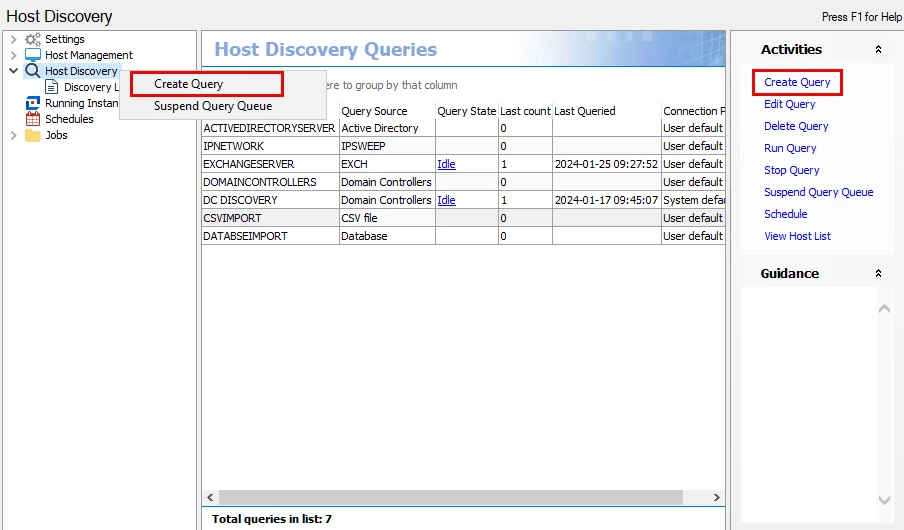
Use the Host Discovery Wizard to create new queries. The wizard opens in the Results pane. Use any of the following methods to access the Host Discovery Wizard from the Host Discovery node:
- Select Create Query in the Activities pane
- Right-click the Host Discovery node and select Create Query from the pop-up menu
- Right-click anywhere in the Host Discovery Queries table and select Create Query from the pop-up menu
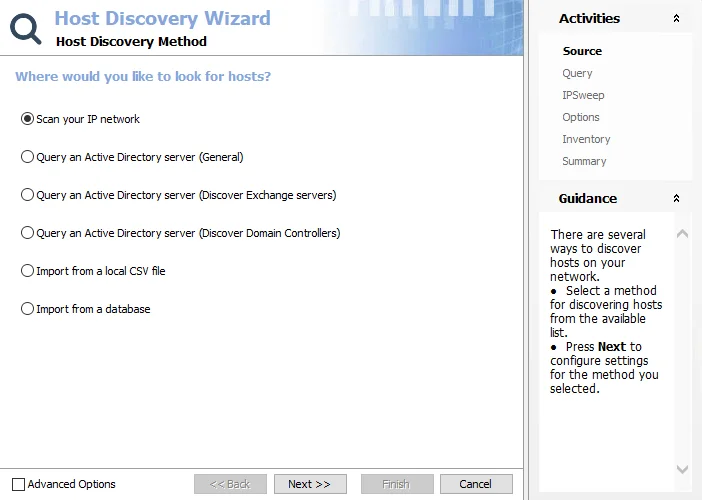
The first step in creating a Host Discovery query is to select the source where the query searches for hosts. Hosts are discoverable using one of the following options:
- Scan IP Network – Scans a specified range of IP Addresses for active hosts and resolves the names of machines using DNS
- Query an Active Directory Server (General) – Scans the default domain controller or a specified server for all computer objects; you can scope it
- Query an Active Directory Server (Discover Exchange servers) – Scans the default domain controller or a specified server but is scoped to return only computer objects sitting in the configuration container for Exchange servers
- Query an Active Directory server (Discover Domain Controllers) – Scans the default domain controller or a specified server but is scoped to return only machines which are domain controllers
- Import From a Local CSV File – Imports a host list from a specified CSV file
- Import From a Database – Imports a host list from a specified SQL Server database
note
The Advanced Options checkbox in the lower-left corner is a legacy item and shouldn't be selected.