Discovery Log
The Host Discovery > Discovery Log node lists host discovery logs. These logs record transactions that occur while host discovery and host inventory tasks run.
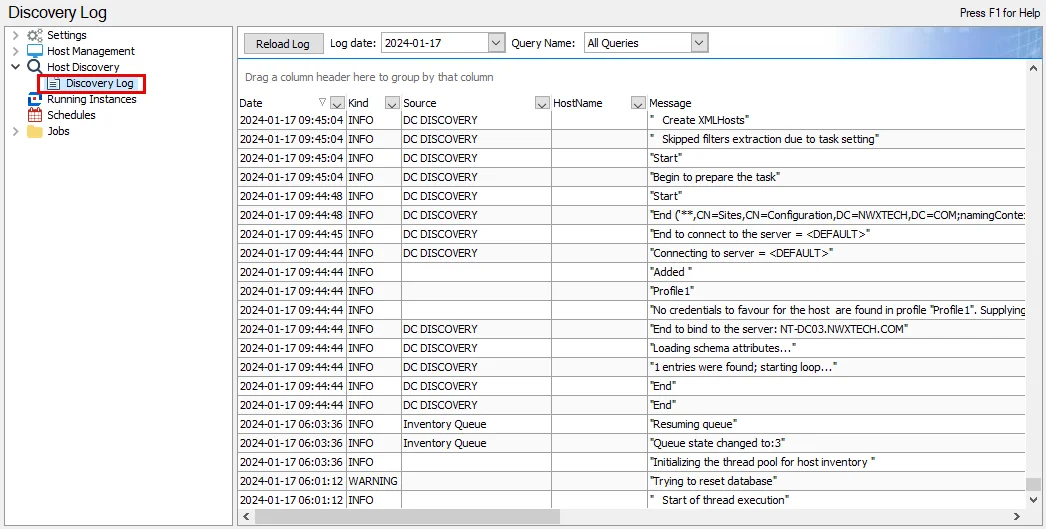
Configure the Discovery Log logging level within the Settings > Host Discovery node. See the Host Discovery topic for additional information.
The following options are above the data grid:
- Reload Log – Refresh the log data for the selected Log date and Query Name
- Log date – Select the Log date you want from the dropdown menu to view transactions
- Query Name – The default selection is All Queries. To narrow the data to a desired query, select a query name from the dropdown menu.
The data grid contains the following columns:
- Date – Date timestamp of transaction
- Kind – Type of transaction recorded (Error, Warning, Info, Debug), controlled by the configured logging level
- Source – Selectively used, the source value reflects the core component responsible for producing the message
- HostName – Name of the targeted host where the transaction occurred
- Message – Log transaction message