SPAA: SharePoint Data Collection Settings
Use the SharePoint data collection settings page to configure additional scan settings. It's a wizard page for the categories of:
- Scan SharePoint Access
- Scan For Sensitive Content
Don't change scans in a way that results in a subsequent scan returning less data (for example, scanning fewer web applications, scanning fewer site collections, or using a shallower depth scan). Enterprise Auditor marks resources not included in a subsequent scan as deleted in the Tier 2 database and subsequently removes them from the Tier 1 database.
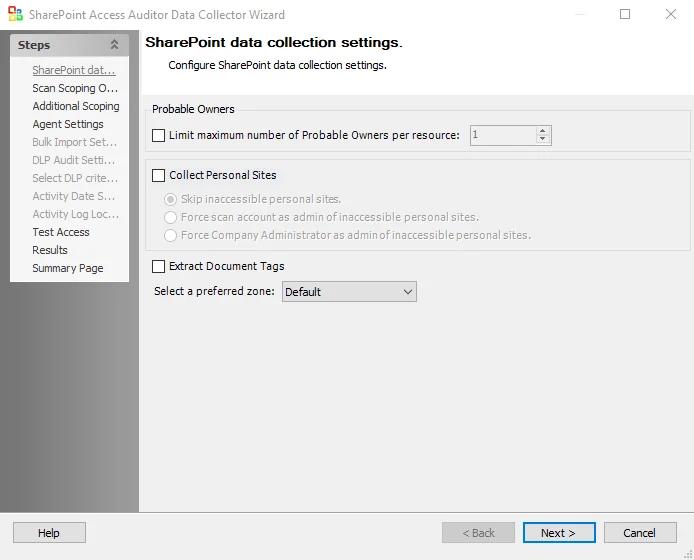
The Probable Owners section provides options for how Enterprise Auditor calculates probable ownership:
- Limit maximum number of Probable Owners per resource: [number] – Return the maximum user supplied number of probable owners per resource
The Collect Personal Sites checkbox enables or disables collection during the scan of personal site collections of individual users. Personal site collections are a SharePoint feature that gives every user their own site collection, and Office 365 uses them to store a user's OneDrive files. By default, only the user to whom a personal site belongs can access it, so the Connection Profile that the data collector is assigned may not have access to some users' personal sites. There are three radio buttons for identifying how the query treats personal sites to which it doesn't have access:
-
Skip inaccessible personal sites – The query doesn't scan inaccessible personal sites
-
Force scan account as admin of inaccessible personal sites – Make the Connection Profile credentials a Site Collection Administrator of any personal sites to which it doesn't have access:
-
The query scans the personal sites
-
When the scan is complete, Enterprise Auditor restores the permissions to what they were before the scan, referring to those credentials made a Site Collection Administrator of personal sites to conduct the scan.
-
Requires the account used in the Connection Profile credentials to have the Global Administrator role for SharePoint Online or be a Farm Administrator for SharePoint on premise. This permission is required to facilitate altering the administrators of site collections.
noteThe Microsoft SharePoint API used to remove personal Site Collection Administrator access is unreliable and occasionally leaves the scanning account as a Site Collection Administrator of personal sites. This may leave the scanning account visible to SharePoint users on the permissions of the files in their personal sites.
infoOnly use this option if that account is clearly identifiable as an administrative account, and advise users that the account could appear on the permissions of their personal site collection documents.
-
-
Force Company Administrator as admin of inaccessible personal sites – Make the special Company Administrator account an administrator of any personal sites to which it doesn't have access
-
The query scans the personal sites
-
When the scan is complete, the Company Administrator account remains an administrator of the users' personal site collections
-
Requires the account used in the Connection Profile credentials to have the Global Administrator role for SharePoint Online or be a Farm Administrator for SharePoint on premise. This permission is required to facilitate altering the administrators of site collections.
noteThe Company Administrator account is a special SharePoint Online and SharePoint 2013 group which contains all accounts which have the Global Administrators role.
-
The Extract Document Tags option enables the collection of metadata tags from Microsoft Office files in SharePoint. Since this option requires retrieving and scanning each document, it results in a noticeable increase in scan time.
-
Select a preferred zone – Use the dropdown list to select a preferred zone within the web application to target the scan. If a targeted web application doesn't have the selected preferred zone, the scan targets the default zone for that web application. Options include:
- Default
- Intranet
- Internet
- Custom
- Extranet