SPAA: Activity Log Locations
Use the Activity Log Locations page to manually configure log locations, avoiding the need for remote registry access to locate the activity event log files. It's a wizard page for the category of Scan SharePoint Activity.
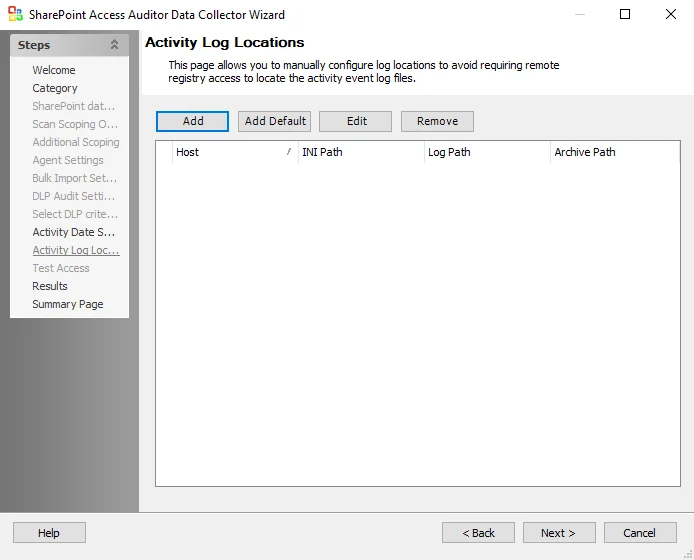
The options in the Activity Log Locations page are:
- Add – Opens the Customize Activity Log UNC Paths location window to add a new host
- Add Default – Opens the Customize Activity Log UNC Paths location window for the default host
- Edit – Opens the Customize Activity Log UNC Paths window for the selected host. If you make edits, click OK to save the changes.
- Remove – Removes the selected host
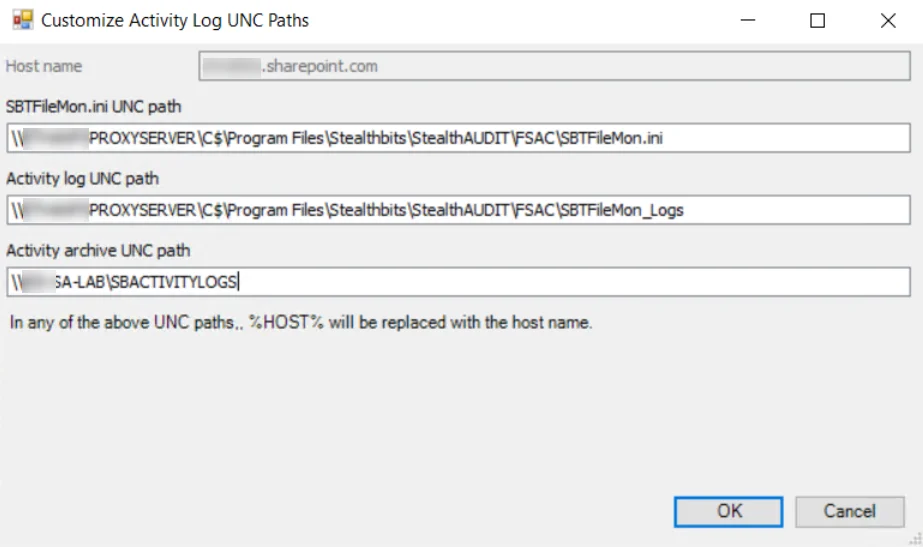
The options in the Customize Activity Log UNC Paths Window are:
-
Host name – Host name of the targeted SharePoint On-Premises server or SharePoint Online tenant
-
SBTFileMon.ini UNC path – UNC path to the location of the SBTFileMon.ini file (as configured in Activity Monitor > Monitored Hosts)
-
Activity log UNC path – UNC path to the location of the SBTFileMon_Logs folder containing the Activity Logs (as configured in Activity Monitor > Monitored Hosts)
noteFor On-Premises environments you don't need to specify an Activity Log UNC path as the Data Collector will default to finding the log locations via the registry.
-
Activity archive UNC path – UNC path to the archive location of Activity Logs (as configured in Activity Monitor > Agents). If archiving isn't enabled in Activity Monitor this can be left blank.
In any UNC paths, Enterprise Auditor replaces %HOST% with the host name.
See the Getting Started with SharePoint & SharePoint Online Activity Monitor topic in the Netwrix Activity Monitor Documentation for additional information.