Services Data Collector
The Services Data Collector enumerates status and settings from remote services. The Services Data Collector is a core component of Enterprise Auditor, and the Windows Solution includes it as a preconfigured component. While the data collector is available with all Enterprise Auditor license options, the Windows Solution is only available with a special Enterprise Auditor license. See the Windows Solution topic for additional information.
Protocols
- RPC
- WMI
Ports
- TCP 135-139
- Randomly allocated high TCP ports
Permissions
- Member of the Local Administrators group
Services Query Configuration
The Services Data Collector is configured through the Service Browser window.
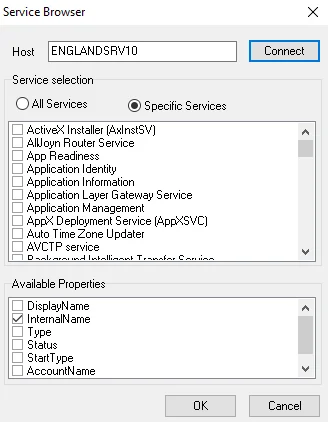
- Host – Enter a sample host which contains all of the services desired for the query
- All Services – Select this option to build the query to extract information from all services on the target host
- Specific Services – Select this option to build the query to extract information from specific services on the target host. Select the checkboxes next to the services you want for the query after clicking Connect.
- Connect – Click Connect to connect to the host and display a list of all services found
- Available Properties – Select the properties to return
In cases where the query doesn't find the selected services on the target host, the
returned InternalName column reflects the DisplayName column, and the query doesn't retrieve
any other values. If the query finds the services on the host, it resolves the DisplayName value
in the table.