VBScript Editor
The VBScript Editor window lets you add a script. The window is ideal for editing small scripts and for pasting larger scripts from external scripting tools.
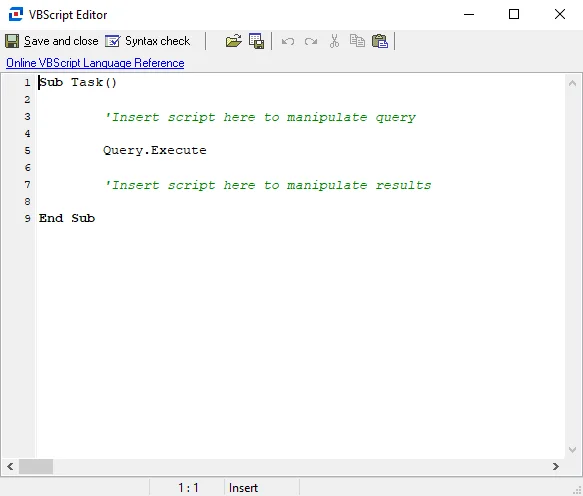
The options in the VBScript Editor are:
- Save and Close – Use this option to save the script and close the window
- Syntax Check – Use this option to check the syntax of your script. This doesn't identify logic errors, only cases where the script syntax is incorrect. It helps reduce the overhead of debugging a script. When you select this option, a Script Errors window opens and runs a syntax check. The window displays any syntax errors.
- Load from file – Use this option to load a VB script from a .vbs file
- Save to file – Use this option to save the current script in the Editor
- Undo – Undo previous changes made to the script (Shortcut is Ctrl+Z)
- Redo – Redo previous changes made to the script (Shortcut is Shift+Ctrl+Z)
- Cut – Cut the highlighted text
- Copy – Copy the highlighted text
- Paste – Paste cut or copied text into the VB Script Editor
- Online VBScript Language Reference – Opens a browser to the Microsoft Technical Documentation website, where you can find documentation for Visual Basic Script
After adding or modifying a script, click Save and close.
See the Script Example 1: Conversion of Data and Script Example 2: Command Query topics for additional information.