NoSQL: Options
Use the Sensitive Data Scan Settings (Options) page to configure additional settings for the sensitive data scan. It is a wizard page for the Sensitive Data Collection category.
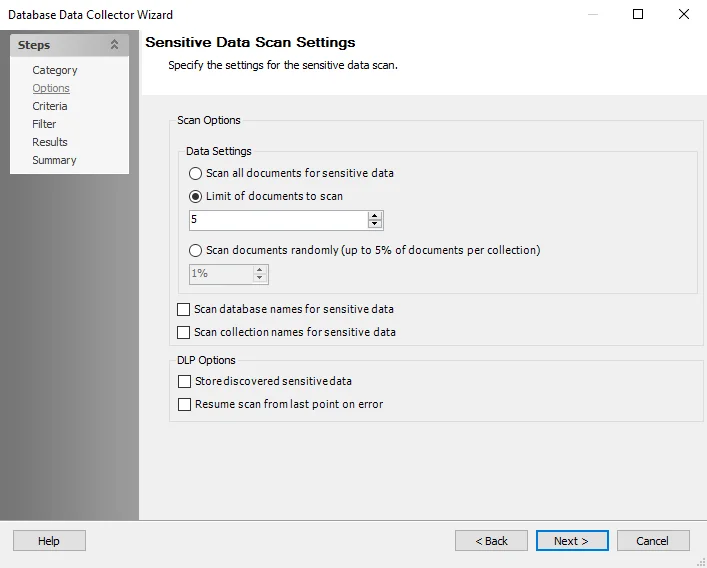
The sensitive data scan settings are:
Scan Options
-
Data Settings:
- Scan all documents for sensitive data — Scan all the documents in a collection in the targeted database or cluster
- Limit of documents to scan — Scan limited number of documents in each database or cluster. This option is ideal when discovering sensitive data and has minimal impact on the MongoDB cluster performance. However, if you use the Subject Profile Request feature, you need to scan all the documents in all the databases or clusters.
- Scan documents randomly — Enterprise Auditor requests a set of documents from each database when scanning for sensitive data. The database engine doesn't return random data from a collection. Instead, Enterprise Auditor returns sequential documents in a collection. To ensure a statistical discrete uniform distribution of scanned data, select this option. When you select this option, the Enterprise Auditor sensitive data scanner requests randomized documents from each collection in all the targeted databases.
-
Scan database names for sensitive data – Scans database names for sensitive data if the database names are included as part of the keyword list in the scanning criteria
-
Scan collection names for sensitive data – Scans collection names within the database for sensitive data if the collection names are included as part of the keyword list in the scanning criteria
DLP Options
-
Store discovered sensitive data – Stores potentially sensitive data in the Enterprise Auditor database. The scan stores any sampled sensitive data discovered based on the matched criteria in the Enterprise Auditor database. Clear this checkbox to disable this functionality.
noteYou must select the Store discovered sensitive data option to view Content Audit reports in the Access Information Center for MongoDB data.
warningChanging scan options, criteria, or filters when resuming a scan may prevent the scan from resuming properly.
-
Resume scan from last point on error — Resumes scan from where the previous scan left off when the scan was stopped as a result of an error
Remember, you need the Sensitive Data Discovery Add-on to use the sensitive data collection option.