NoSQL: Criteria
Use the Criteria page to configure the criteria for discovering sensitive data. It is a wizard page for the category of Sensitive Data Collection.
This page requires you to install the Sensitive Data Discovery Add-On on the Enterprise Auditor Console to define the criteria and enable the Criteria Editor. See the Sensitive Data Discovery Add-On Installation topic for additional information.
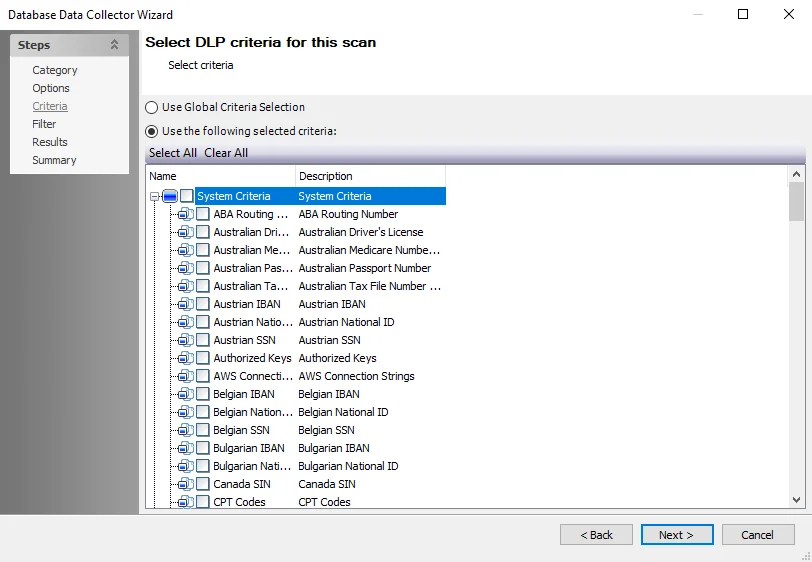
The options on the Criteria page are:
-
Use Global Criteria Selection – Select this option to inherit sensitive data criteria settings from the Settings > Sensitive Data node. See the Sensitive Data topic for additional information.
-
Use the following selected criteria – Select this option to use the table to select which sensitive data criteria to scan for
- Select All – Click Select All to enable all sensitive data criteria for scanning
- Clear All – Click Clear All to remove all selections from the table
- Select the checkboxes next to the sensitive data criteria options to include them in the scan during job execution
The table contains the following types of criteria:
Until you install the Sensitive Data Discovery Add-On, only the headers for the System Criteria and User Criteria nodes are visible in the table.
-
System Criteria – Lists pre-defined criteria
-
User Criteria – Lists user-defined criteria
Use the Sensitive Data Criteria Editor in Settings > Sensitive Data to create and edit user-defined criteria. See the Sensitive Data Criteria Editor topic for additional information.
Adding unnecessary criteria can adversely impact the scanner performance and can cause the scanning job to take a long time. If performance suffers, revisit the sensitive data scanning criteria and remove criteria that isn't required.