ExchangePS: Scope
The Scope page establishes how the data collector scopes mailboxes. It is a wizard page for all of the categories.
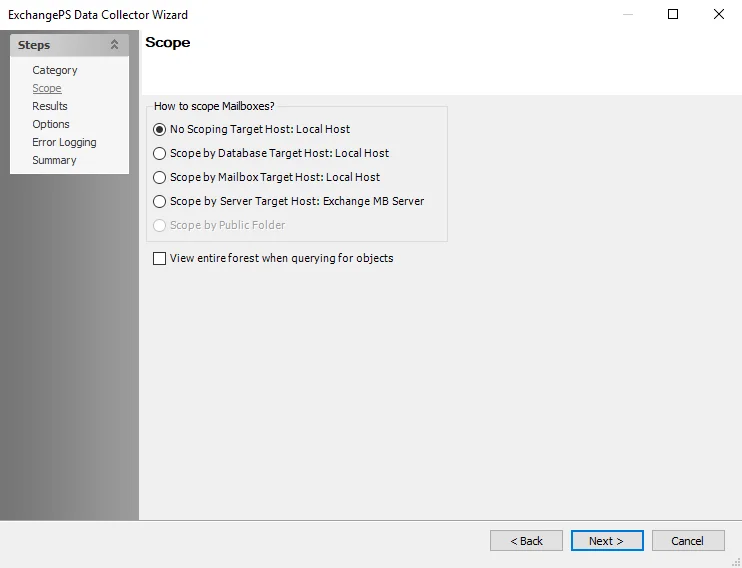
Available scoping options vary based on the category selected. Scoping options include:
-
No Scoping Target Host: Local Host – Returns all results for the entire targeted Exchange Organization
- If you select this option, run the data collector against the host specified on the Summary page. See the ExchangePS: Summary topic for additional information.
- When using the applet, the data collector gathers information about the Exchange Forest in which the Enterprise Auditor Console resides
- For Remote PowerShell, the data collector gathers information about the Exchange Organization to which you made the Remote PowerShell connection. This refers to the server entered in the Client Access Server (CAS) field of the global configuration from the Settings > Exchange node or on the this page.
-
Scope by Database Target Host: Local Host – Scope query to return results for specific databases. If this option is selected, the Scope by Database page is enabled in the wizard. See the ExchangePS: Scope by DB topic for additional information.
-
Scope by Mailbox Target Host: Local Host – Scope query to return results for specific mailboxes. If this option is selected, the Scope by Mailboxes page is enabled in the wizard. See the ExchangePS: Scope by Mailboxes topic for additional information.
-
Scope by Server Target Host: Exchange MB Server – Scope query to return results for specific servers selected in the job’s Configure > Hosts node
- When using the applet, the data collector deploys a process to the targeted host to run the PowerShell on that server
- For Remote PowerShell, the data collector doesn't deploy anapplet and uses the WinRM protocol to gather information about the objects on that server. See the Remote PowerShell and The Exchange Applet topics for additional information.
-
Scope by Public Folder – Scope query to return results for specific Public Folders. If this option is selected, the Scope by Public Folders page is enabled in the wizard. See the ExchangePS: Scope by Public Folders topic for additional information.
-
View entire forest when querying for objects – Select this checkbox to scan the entire forest when querying for objects