ExchangeMailbox: SDD Criteria
Use the SDD Criteria page to configure criteria for discovering sensitive data. It is a wizard page for the Mailbox sensitive data discovery category. This page requires you to install the Sensitive Data Discovery Add-On on the Enterprise Auditor Console to define the criteria and enable the Criteria Editor. See the Sensitive Data Discovery Add-On Installation topic for additional information.
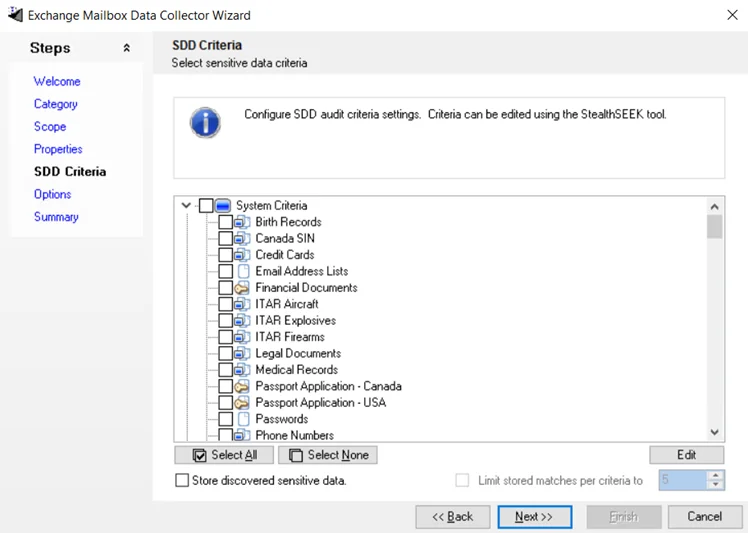
Select the checkbox for each criterion you want to use to search for sensitive data. You can also select criteria using the Select All and Select None buttons.
The table contains the following types of criteria:
-
System Criteria – Lists pre-defined criteria
-
User Criteria – Lists user-defined criteria
noteUntil you install the Sensitive Data Discovery Add-On, only the headers for the System Criteria and User Criteria nodes will be visible in the table.
-
Edit – Click this button to access the Criteria Editor, where you can create or customize user-defined criteria. See the Sensitive Data Criteria Editor topic for additional information.
-
Store discovered sensitive data – Stores the potentially sensitive data that matches the selected criteria in the Enterprise Auditor database. Select this checkbox to store a copy of the criteria match data. Use this copy to check for false positives, data that matches the selected criteria but isn't actually sensitive.
-
Limit stored matches per criteria to [number] – Identifies the number of potentially sensitive data matches copied to the database. The default is 5 matches. This option is only available if the Store discovered sensitive data option is selected.