Applies To Tab
Use the Applies To tab to specify the scope for application of the analysis rules. The analysis module applies rules to data collected from all hosts, from specific hosts, or from the specific host running the job (local data). It filters data based on a specified time window.
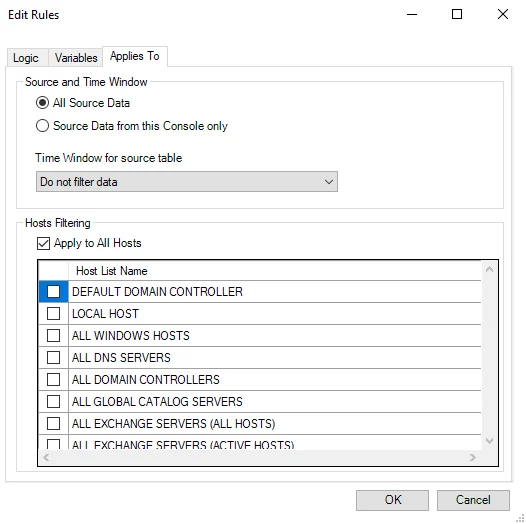
The Applies To tab provides the following options:
-
Source and Time Window – Specify whether to exclude data from outside of the Enterprise Auditor console and apply a filter to the time window of the data
-
All Source Data – Select this option to run the action using all data
-
Source Data from this Console only – Select this option to run the action specifically using data from only this Enterprise Auditor console
-
Time Window for source table – Use the dropdown menu to specify a time window from the following options:
- Most recent data – Use only the most recently collected data
- Cumulative data for offline hosts – Use data collected from offline hosts
- Most recent data filtering duplicate and offline hosts – Use most recent data excluding duplicate and offline hosts
- Don't filter data – Use unfiltered data
-
-
Hosts Filtering – Specify source hosts
- Apply to All Hosts – Select this checkbox to use all hosts to query
- Host List – Select any desired hosts to query. If you select Apply to All Hosts, the list is unavailable.