Survey: Web Server
Use this page to specify information about the web server hosting the survey website.
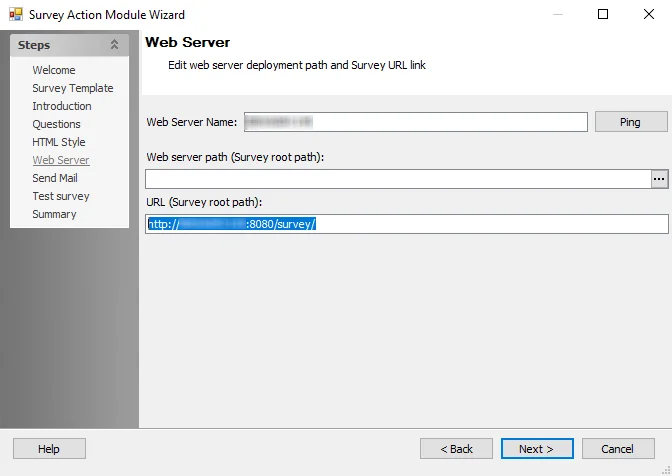
The configurable options are:
-
Web Server Name – Specify the name of the server hosting the survey
-
Web server path (Survey root path) – Specify the root path to the folder on the web server containing the scripts that build and operate the survey web page
- Click the ellipses (...) to open the Browse For Folder window to navigate to the folder on the web server containing the scripts that build and operate the survey web page
-
URL (Survey root path) – Specify the root path of the web page location
Use HTTPS for the survey website
By default, the survey web server (a bundled Apache Tomcat instance) accepts only HTTP connections on port 8080. To serve surveys over HTTPS, enable Tomcat's SSL connector and then use an HTTPS URL on this page.
You need a certificate in Personal Information Exchange (PFX) format, also called PKCS #12, that includes the private key. The certificate's Common Name or Subject Alternative Name must match the server name in the survey URL.
To enable HTTPS:
Step 1 – Copy the PFX file to the survey web server, for example C:\Certs\survey.pfx. The account that runs the StealthAUDITSurvey service needs read access to the file.
Step 2 – Open the following file in a text editor as an administrator:
%SAInstallDir%\Actions\Survey\Tomcat\conf\server.xml
Step 3 – Find the commented-out connector for port 8443 and remove the <!-- and --> lines around it. Then edit the connector so it matches the following example, replacing the file path and password with your own values:
<Connector port="8443" protocol="org.apache.coyote.http11.Http11Protocol"
           maxThreads="150" SSLEnabled="true" scheme="https" secure="true"
           clientAuth="false" sslProtocol="TLS"
           keystoreFile="C:\Certs\survey.pfx"
           keystorePass="YourPfxPassword"
           keystoreType="PKCS12" />
keystoreFile– Full path to the PFX filekeystorePass– Password for the PFX filekeystoreType– Must bePKCS12for a PFX file
The server.xml file stores the PFX password in plain text. Restrict access to this file to administrators and the account that runs the StealthAUDITSurvey service.
Step 4 – Save the file, then restart the StealthAUDITSurvey service.
Step 5 – If survey recipients connect from other computers, allow inbound TCP port 8443 through the firewall on the survey web server.
Step 6 – On this page, set the URL (Survey root path) to https://<ServerName>:8443/survey/, using the same server name as on the certificate. Then, on the Test Survey page, click Start test to confirm that the survey web server responds.
The action now uses the HTTPS URL in the survey links it emails.
If the survey link returns a connection refused error, the HTTPS connector didn't start. Check the logs in %SAInstallDir%\Actions\Survey\Tomcat\logs for keystore errors, such as an incorrect password or file path. If the browser shows a "Not secure" warning, confirm the server name matches the certificate and that recipients' computers trust the issuing certificate authority.