Mailbox: Sampling Host
Use the Sampling Host page to specify the Exchange server to target. It is a wizard page for all operation types.
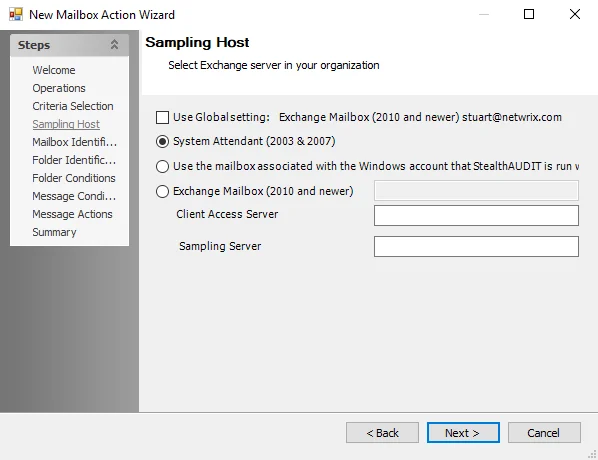
Select an Exchange server to target using the following options:
-
Select the Use Global Setting checkbox to query the global Exchange setting
-
Use the radio buttons to select a specific host
-
System Attendant (2003 & 2007) – Audits Microsoft Exchange 2007 or older versions
-
Use the mailbox associated with the Windows account under which Enterprise Auditor runs – Uses either the account logged into the Enterprise Auditor Console server or the account set to run the Enterprise Auditor application to access the Exchange mailbox
-
Exchange Mailbox (2010 and newer) – Allows specifying an Exchange Mailbox Alias for MAPI connections
- When you select Exchange Mailbox (2010 and newer), the textbox becomes enabled. Enter the Alias name in the textbox. The Alias needs to be an Exchange 2010 or newer mailbox, not a mail-enabled service account. However, this mailbox doesn't need rights on the Exchange Organization; it only needs to reside within it.
- Client Access Server – Enter the name of the physical CAS in the textbox. This server can be part of an array, but do enter the name of a CAS Array. This should also be the Exchange CAS where you've enabled both Remote PowerShell and Windows Authentication on the PowerShell Virtual Directory.