File System Action: Options
The Options page provides access to additional options for the action. Based on the selection on the Operation page and other choices made within the wizard, not all options on this page may be available.
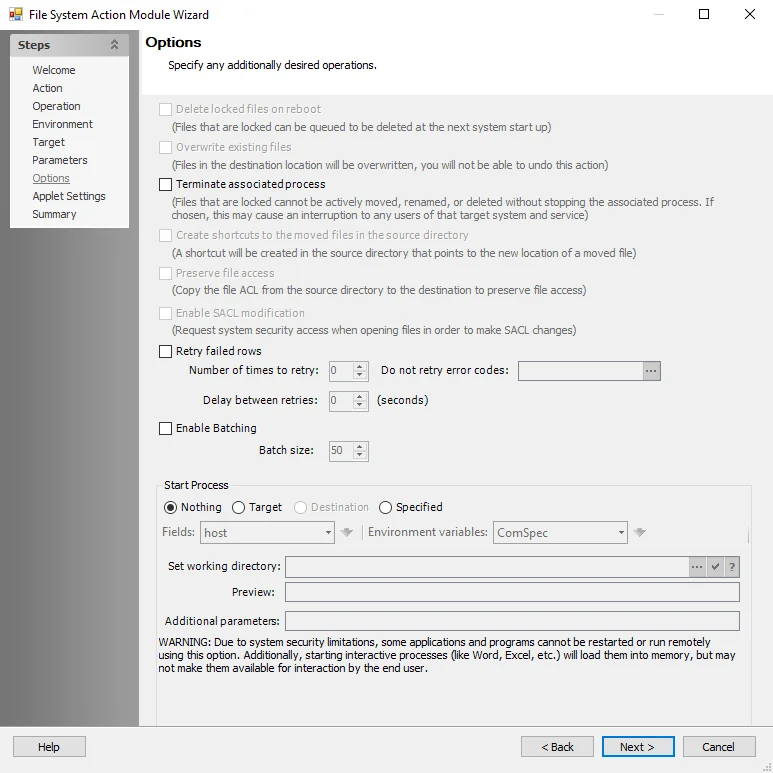
Select from the following additional operations:
-
Delete locked files on reboot – Queues locked files for deletion at the next system startup
-
Overwrite existing files – Overwrites files in the destination location. This action can't be undone.
-
Terminate associated process – You can't move, rename, or delete locked files without stopping the associated process. Selecting this option may interrupt any users of that target system and service.
-
Create shortcuts to the moved files in the source directory – Creates a shortcut in the source directory that points to the new location of a moved file
-
Preserve file access – Copy the file ACL from the source directory to the destination to preserve file access. Child objects, with inherited permissions or broken inheritance, targeted by copy or move actions retain their permissions. Parent folders with inherited permissions become explicit.
-
Enable SACL modification – Request system security access when opening files to make SACL changes
-
Retry failed rows – Enter the following information:
- Number of times to retry
- Don't retry error codes – Excludes rows of data with error codes listed in this textbox from the action performed. The action already includes common error codes for certain actions; you can customize the list to add or remove error codes. See the Microsoft System Error Codes article for additional information.
- Delay between retries
-
Enable batching – (For big data sets) Enabling batching breaks the data set into batches so the action doesn't attempt to execute all lines at once. Actions performed on tables with a large number of input rows may fail due to network failure, making it hard to determine which actions ran before the failure.
- Batch size – Specify the batch size.
Start Process
Select the start process you want.
Due to system security limitations, some applications and programs can't be restarted or run remotely using this option. Additionally, starting interactive processes (such as Word, Excel, and so on) will load them into memory, but may not make them available for interaction by the end user.
Use the fields provided to select target items and hosts from the dropdown lists and populate the Set working directory field, or edit the field manually. The Preview field updates based on the contents of the Set working directory field.