File System Action: Destination
The Destination page is available only if the following operations are selected:
- Copy
- Move
- Rename
Define the destination location for the files to copy, move, or rename by building the destination path using the Fields and Environment Variables options as needed.
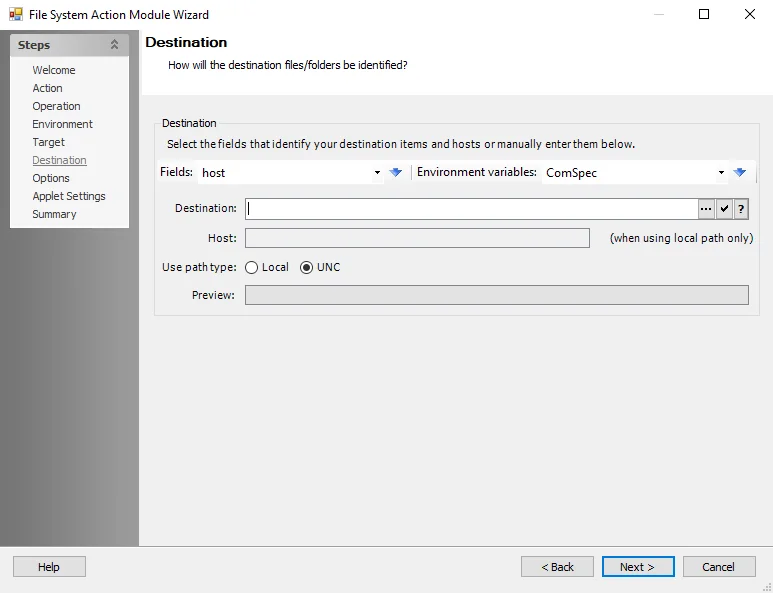
Use the fields provided to select destination items and hosts from the dropdown lists and populate the Destination field, or edit the field manually. The Preview field updates based on the contents of the Destination field.
-
Fields – Use the dropdown list to select a field (column) from the source table, then click the blue arrow to insert the item into the Destination field
-
Environment Variables – Select an item from the dropdown list, then click the blue arrow to insert the item into the Destination field
-
Target Items – Enter the path to the target file or folder
- Click the ellipsis (…) to browse for pattern path specification
- Click the tick icon to show a preview of the specified path
- Click the Help icon for additional information
-
Host – Select the field that identifies the systems or manually enter the host destination
-
Use path type – Choose from the following options:
- Local – Uses the local path
- UNC – Uses the UNC path
-
Preview – Shows what the specified compound path resolves to. The text here initializes the file specification selection dialog.