Active Directory Action Operations
Use Operations page to select one or more operations for the action to perform on the targeted Active Directory objects. Some operations have wizard pages to specify the configuration settings.
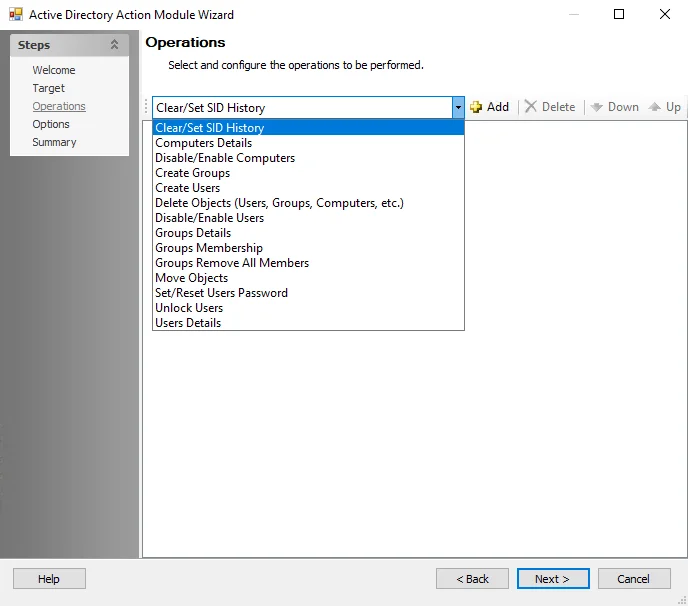
The Operations dropdown menu contains the following operations:
- Clear/Set SID History
- Computer Details
- Disable/Enable Computers
- Create Groups
- Create Users
- Delete Objects
- Disable/Enable Users
- Group Details
- Group Membership
- Groups Remove All Members
- Move Objects
- Set/Reset Users Password
- Unlock Users
- Users Details
Select an operation from the dropdown list and then click Add. The selection appears in the Selections pane as well as the navigation pane if there is an associated configuration page. If performing multiple operations, the action executes the operations in the order in which they appear here. To change the order, select an operation and use the Down and Up buttons.
Delete Objects
Once deleted, objects from Active Directory can't be restored.
Select this operation to delete objects from Active Directory, such as users, groups, or computers. The source table determines which objects the action deletes from Active Directory. This operation doesn't have its own wizard window.
Groups Remove All Members
Select this operation to remove all members from groups located in the source table. This operation doesn't have an associated wizard window and requires no configuration.
Unlock Users
Select this operation to unlock the account of the specified users in the source table. This operation doesn't have an associated wizard window and requires no configuration.